The Vision
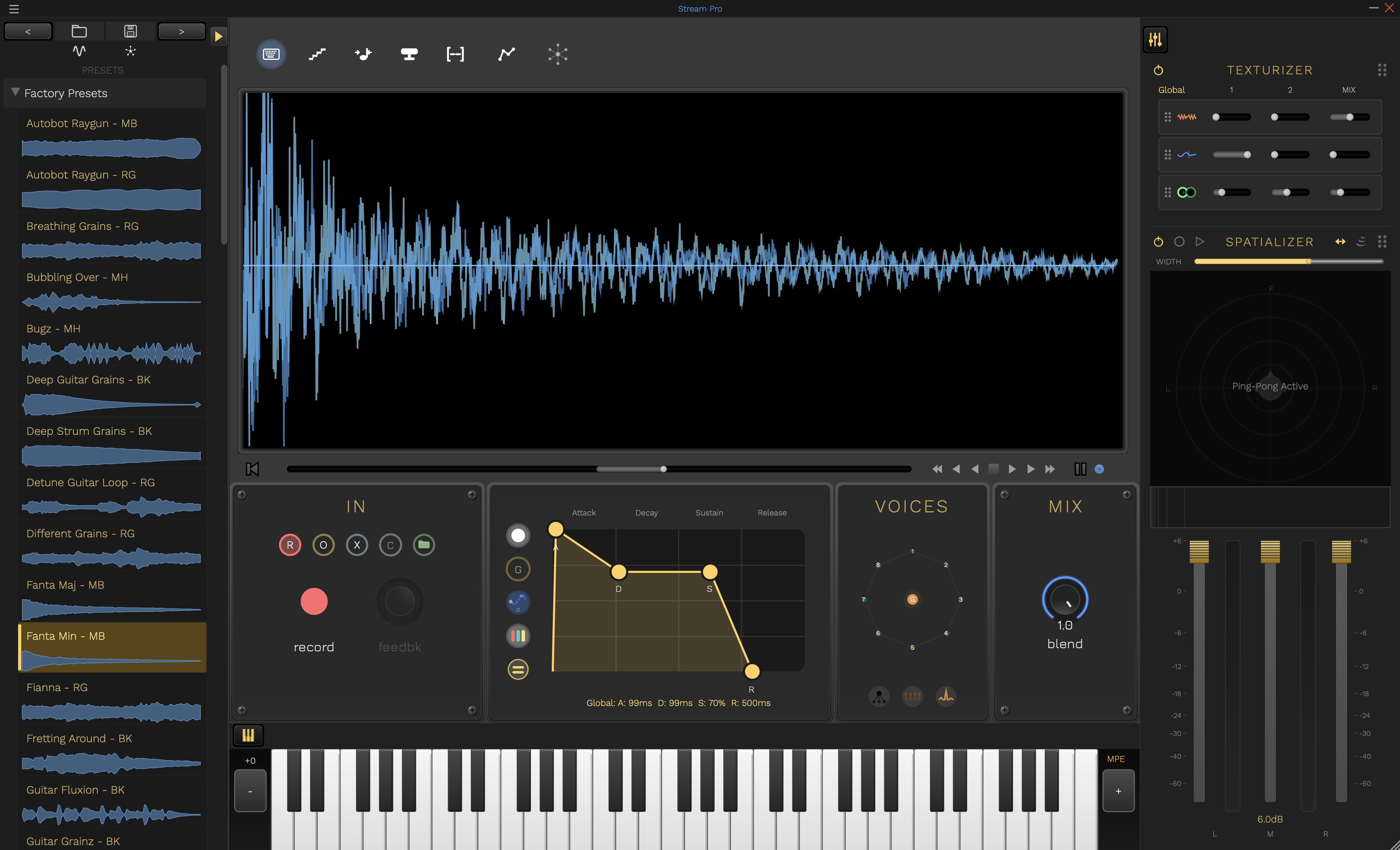
A complete granular synthesis platform: texture creation, melodic instruments, immersive 3D spatial audio, and polyphonic effects - all in one plugin.
Download
Complete Feature Set
Foundation: Two Modes, Infinite Possibilities
Master the fundamentals of granular synthesis with two powerful approaches.
Single Mode
Turn Any Sound into Evolving Textures
- Grain-based time manipulation
- Independent pitch and time control
- Perfect for pads, drones, and atmospheres
- Real-time sample scrubbing
Multi Mode
Play Your Samples Like an Instrument
- Full polyphonic MIDI tracking
- Per-voice grain manipulation
- Create playable granular instruments
- Performance-ready with velocity sensitivity
3D Spatial Granular Synthesis
Take granular synthesis into the third dimension with immersive spatial audio.
Polyphonic 3D Spatializer
Each grain becomes a spatial object that can move through 3D space. Play chords where every note occupies its own position in the stereo field and beyond.
Binaural HRTF Processing
Powered by Steam Audio, experience true 3D positioning with head-related transfer functions for realistic spatial perception through headphones.
Integrated Spatial Control
New spatializer section in the interface for intuitive 2D positioning with per-voice control in Multi mode.
Motion & Automation
Animate grain positions in 3D space. Create swirling, orbiting, or random-walk grain clouds that evolve over time.
The Vision: Imagine playing a granular pad where each grain orbits around you in 3D space, or a polyphonic instrument where each note has its own spatial position. Phase 2 brings cinematic spatial audio to granular synthesis.
Polyphonic Effects Chain
Add character, aggression, and harmonic complexity with advanced polyphonic distortion.
Per-Voice Distortion
Independent distortion processing for each polyphonic voice. Create complex harmonies where each note has its own character and saturation.
Grain-Level Processing
Distort individual grains before they're mixed. Achieve unique timbres impossible with traditional distortion.
Multiple Distortion Algorithms
From warm tube saturation to aggressive digital destruction. Shape your sound with a palette of distortion types.
Spatial Distortion Integration
Combine Phase 2's spatial audio with Phase 3's distortion. Create aggressive, spatially-distributed soundscapes.
The Result: Stream Pro is now a complete sound design powerhouse. From pristine granular textures to spatially-distributed aggressive synthesis. One plugin, limitless sonic possibilities.
Free Companion Apps
Parameter Space and Spectral Space have graduated from the plugin UI into their own free standalone applications. Along with the Leap Motion Controller, these companion apps connect to Stream Pro via virtual MIDI.
Parameter Space
Octagonal Radar Control Surface
A dedicated full-screen interface for shaping up to 8 granular parameters simultaneously. Supports Global, Per-Voice, and Hybrid interaction modes with bi-directional sync to Stream Pro.
- 8-axis parameter control (Size, Density, Spread, Jitter, Drive, Cutoff, Resonance, Delay)
- Per-voice polygon editing for unique timbres on each MIDI note
- Connects to Stream Pro via virtual MIDI
Spectral Space
Timbre-Based Audio Navigator
A dedicated full-screen interface for exploring your audio as a cloud of segments positioned by timbral similarity. Navigate by feel rather than time, record trajectories, and scrub through spectral neighborhoods.
- 3D spectral visualization with cluster-based navigation
- Trajectory recording for automated evolving playback paths
- Connects to Stream Pro via virtual MIDI
Leap Motion Controller
Gestural Instrument Control
Control Stream Pro with hand gestures using a Leap Motion controller. Per-finger grain control, gesture-based loop commands, and expressive MPE output.
- Per-finger grain position, size, and pitch control
- Circle, swipe, and pinch gestures for loop control
- Connects to Stream Pro via virtual MIDI / MPE
Why standalone? Moving these features out of the plugin gives them dedicated full-screen interfaces with more room to breathe. Run them on a second screen or tablet alongside Stream Pro for a modular, hands-on workflow without cluttering the main plugin UI.
Installation
macOS
- Download and open the DMG file
- Double-click the PKG installer
- Follow the installation wizard
- Plugins will be installed automatically to:
- AU:
~/Library/Audio/Plug-Ins/Components/ - VST3:
~/Library/Audio/Plug-Ins/VST3/ - Standalone:
/Applications/
- AU:
- Restart your DAW and rescan plugins
Windows
- Download and extract the ZIP file
- Copy
Stream Pro.vst3to:C:\Program Files\Common Files\VST3\ - Copy
Stream Pro.exeto your preferred location - Restart your DAW and rescan plugins
Linux
- Download and extract:
tar -xzf streampro-linux.tar.gz - Run the installer:
bash StreamPro/install.sh— it places the VST3 in~/.vst3, the standalone in~/.local/share/StreamPro, and (one optionalsudoprompt) the factory preset library - Restart your DAW and rescan plugins
First time on Linux? Follow the step-by-step Linux Setup Guide.
Getting Started
Two Modes, Infinite Possibilities
Stream Pro offers two powerful modes for different creative workflows:
Single Mode
Traditional Granular Synthesis
- Load an audio sample or record live input
- Adjust grain size, density, and playback position
- Perfect for creating evolving textures, pads, and drones
- Use the position controls to scrub through your sample
Multi Mode
Polyphonic Granular Synthesis
- Play your samples chromatically across a MIDI keyboard
- Each key triggers independent granular voices
- Create playable granular instruments
- Full velocity sensitivity and polyphonic support
Basic Workflow
-
Load a Sample
Drag and drop an audio file or use the file browser to load your source material.
-
Choose Your Mode
Toggle between Single Mode for textures or Multi Mode for playable instruments.
-
Adjust Grain Parameters
- Grain Size: Controls the length of each grain
- Grain Density: How many grains play simultaneously
- Position: Where in the sample grains are captured from
-
Shape the Sound
Use the envelope controls to shape grain attack/release, and adjust pitch and time independently.
-
Add Effects
Apply built-in effects for further sound design and polish.
Single Mode Guide
Single Mode is perfect for creating evolving textures, ambient soundscapes, and granular transformations of your audio.
Recording Modes
Cycle through three recording modes to capture and manipulate live audio input:
1. Record Mode
Captures fresh audio into the buffer, replacing any existing content. Perfect for starting a new loop or texture from scratch.
- Clears the current buffer
- Records new audio from the beginning
- Best for: Starting new ideas
2. Overdub Mode
Layers new audio on top of existing material without erasing what's already there. Great for building complex, layered textures.
- Adds to existing audio
- Preserves previous recordings
- Best for: Building layers
3. Replace Mode
Selectively replaces sections of the buffer with new audio. Useful for updating specific parts while keeping the rest intact.
- Overwrites only recorded sections
- Maintains timing structure
- Best for: Refining loops
Single Workflow
-
Select Recording Mode
Cycle through Record, Overdub, or Replace mode using the mode selector.
-
Capture Audio
Hit record and capture live input or load a pre-recorded sample.
-
Adjust Grain Position
Use the position control to determine where grains are captured from the buffer.
-
Manipulate Time & Pitch
Independently control playback speed and pitch for creative transformations.
Multi Mode Guide
Multi Mode transforms your samples into fully playable, polyphonic granular instruments with MIDI control.
Voice Markers
Each active voice in Multi mode is shown as a colored diamond marker in the waveform display. The marker sits at the top of a vertical line whose height indicates the current grain size. Grain windows for each voice cluster visually around their diamond, giving you an at-a-glance view of where every voice is reading and how widely its grains are scattered.
Multi Workflow
-
Load Your Sample
Import an audio file that will serve as your sound source for the granular instrument.
-
Enable Multi Mode
Toggle to Multi mode to enable polyphonic MIDI tracking.
-
Play with MIDI
Use your MIDI keyboard to trigger granular voices chromatically across the keyboard range.
-
Adjust Per-Voice Settings
Right-click on VoicePlayHead markers to solo, mute, or adjust individual voice parameters.
-
Fine-Tune Grain Parameters
Adjust grain size, density, and envelope to shape the character of your instrument.
Performance Tips
- Use velocity to dynamically control grain density and volume
- Experiment with different sample start positions for varied timbres
- Layer multiple instances with different grain settings for rich textures
- Automate grain parameters in your DAW for evolving sounds
MIDI Mapping Editor
Complete MIDI CC and Program Change control for all parameters with an intuitive mapping interface.
Access the MIDI Mapping Editor
Press Command+M (macOS) or Ctrl+M (Windows/Linux) to open the centralized MIDI mapping interface.
Key Features
Comprehensive Parameter View
See all automatable parameters in a sortable table view, organized by category (Capture, Grain, Envelope, Mix, Playback, Locators).
MIDI Learn Mode
Click "Learn" next to any parameter, then move a MIDI controller or send a Program Change to instantly create the mapping.
Real-Time Activity Indicator
Visual feedback shows incoming MIDI CC and Program Change messages with their values, making mapping intuitive and immediate.
Persistent Mappings
All MIDI mappings are automatically saved to ~/XStream/MidiMappings.xml and persist across sessions and plugin instances.
Search & Filter
Quickly find parameters using the search box or filter by category to focus on specific sections of the plugin.
Program Change Support
Map MIDI Program Change messages to button parameters for instant preset switching or toggle controls via your MIDI controller.
Quick Start Guide
-
Open the MIDI Mapping Editor
Press Command+M (or Ctrl+M on Windows/Linux) to launch the mapping interface.
-
Find Your Parameter
Use the search box or category filter to locate the parameter you want to control.
-
Enter Learn Mode
Click the "Learn" button next to your desired parameter. The row will highlight to indicate learn mode is active.
-
Send MIDI
Move a knob, fader, or button on your MIDI controller. The mapping will be created instantly and displayed in the "Mapping" column.
-
Test Your Mapping
Close the editor and move your controller - the parameter will respond immediately. Watch the MIDI Activity indicator to confirm messages are being received.
Right-Click Context Menu
You can also access MIDI Learn directly from parameter controls:
- Right-click on any knob, slider, or button in the main interface
- Select "MIDI Learn" from the context menu
- Move your controller to create the mapping
- Select "Clear MIDI Mapping" to remove an existing assignment
Pro Tips
- Program Change for Buttons: Use MIDI Program Change messages to control button parameters (Pause, Freeze, Record modes, etc.)
- CC for Continuous Control: Use MIDI CC messages for knobs and sliders (Grain Size, Density, Position, etc.)
- One Controller, One Parameter: Each MIDI CC/PC number can only control one parameter at a time - new mappings replace old ones
- Persistent Across DAWs: Mappings are stored globally and work across all DAWs and plugin instances
- Clear Individual Mappings: Use the "Clear" button in the mapping editor or right-click menu to remove unwanted assignments
Development Updates
v2.0.12 - September 2026
- Space bar is transport play/stop. Whenever the plugin has keyboard focus, Space toggles the transport, including while the QWERTY keyboard mode is on. Buttons no longer hold keyboard focus after a click, so Space can no longer re-trigger the last button you pressed.
- New shortcuts for the matrices. Cmd+Shift+1 (Ctrl+Shift+1) opens the MIDI matrix, Cmd+Shift+2 the Modulation Matrix, and Esc closes either. These replace Cmd+Shift+M.
- LFO Retrig visibly resets. The mod matrix's LFO preview now snaps to the restart on Retrig, Note and Remote retriggers instead of easing toward it invisibly. The button is labelled Retrig to match the "LFO n Retrigger" parameters it maps through.
- MIDI matrix tidy-up. The internal "Audio Buffer Version" counter is hidden, categories now mirror the panels (Capture & Record, Transport, Notes & MIDI, Grains, Grain Window, Voice ADSR, Buffer Envelope, Multi Mode, MPE, Texturizer, Spatializer, Modulation, Output & Mix, Loop Locators) with no "Other" bucket, and the spatial voice positions read Voice 1 to 8.
- Leaner buffer right-click menu. The View Controls, Grid and MIDI Learn submenus are gone; the menu offers MIDI Matrix and Modulation Matrix entries with their shortcuts instead.
v2.0.11 - September 2026
- On-screen keyboard tamed for trackpads. A small dead zone before any pitch bend or timbre is sent, and bend now follows the keys on screen (an octave of keys is an octave of bend) instead of the controller profile's range. In Single mode each new note now starts exactly on its own pitch rather than scooping in from the previous note's bend.
- Shift+click to latch a key. The 500 ms long-press sustain is gone, since a slow trackpad press tripped it by accident and left notes sounding. Shift+click a key to hold it; click it again to release.
- VOICES centre node. Clicking the centre of the voice circle in Multi mode now reliably switches the edit target to the global layer and keeps it there, exactly like pressing G, until you pick a voice.
- Ping-pong button follows the preset. The spatializer's ping-pong toggle now reflects the loaded preset's state (and MIDI or automation changes) instead of showing the last thing you clicked.
v2.0.10 - September 2026
- Tighter note changes. Changing notes now re-triggers the grains at the new pitch immediately, in Single mode and in Multi mode with Mono Repitch, instead of each grain drifting to the new pitch at its next cycle (up to a full grain length of the old note). Mono Repitch release tails now hold the last pitch rather than falling back to the older notes.
- Multi mode plays the 9th note. With all 8 voices busy, a further note now steals a voice instead of being dropped.
- Loop-seam click fixed for stereo audio. Stereo buffers, including every factory preset, now get the same crossfade at the loop wrap as mono audio, removing a click that long grains made obvious.
- Side panel layout. The Texturizer and Spatializer sections stay flush after swapping their order.
v2.0.9 - September 2026
- Linux compatibility fix. The Linux build is now compiled against Ubuntu 22.04, so it runs on Linux Mint 21+, Ubuntu 22.04+, and Debian 12+ (v2.0.6–v2.0.8 required a newer glibc and failed to load on those systems with a “GLIBC_2.38 not found” error).
v2.0.8 - September 2026
- Clearer browser icons. Load Audio now shows a sample-like waveform and Load Mod matches the Modulation Matrix icon, so the pair reads at a glance.
- "Tape Pitch Glide." Multi mode's speed/direction smoothing is renamed for the effect it produces.
v2.0.7 - September 2026
- MIDI and modulation matrices, individuated. They now have their own toolbar icons — a 5-pin MIDI DIN plug for MIDI mapping and a multiply-sign-plus-sine-wave for the Modulation Matrix — each opening its own dedicated panel instead of a tabbed menu.
- "Sync all" for LFOs. A one-click button on the Modulation Matrix's LFO header tempo-syncs every LFO at once.
v2.0.6 - September 2026
- Preset fix. The Fianna preset shipped with delay fully wet (no dry signal), so it seemed to play with a large latency — its delay mix is now balanced (#84).
- Linux packaging. The Linux build now bundles its SteamAudio library with a correct runpath plus the factory presets and an install script, so it loads and installs cleanly.
v2.0.5 - August 2026
- Filter resonance fix. The resonance slider no longer snaps/sticks when editing the global layer in Multi mode — it now tracks smoothly across its full range.
- Standalone input routing. Input-channel selection is now honored on interfaces with many inputs or more than two outputs (previously it could silently fall back to the first two channels).
v2.0.4 - August 2026
- Disabled controls read as grey. Toolbar buttons inactive in the current mode (e.g. mono repitch in Single mode) now show a greyed-out icon.
v2.0.3 - August 2026
- Clearer disabled controls. Toolbar buttons that are inactive in the current mode (e.g. mono repitch in Single mode) now show a greyed-out background instead of looking clickable.
v2.0.2 - August 2026
- Preset levels. Nine factory presets that could drive the internal safety limiter into audible distortion at louder settings have been pulled back to unity output (#83).
- Cleaner toolbar. The mono repitch control is now greyed out in Single mode, where it has no effect.
v2.0.1 - August 2026
- Pitch-tracking fix. Held-note pitch selection is now correct last-note priority in both Single mode and Multi-mode mono repitch (a note-ordering bug could cause the played pitch to only update at certain intervals). Mono repitch also now follows MPE pitch bend across the whole voice cluster.
v2.0.0 - August 2026
Stream Pro 2.0 — the first full release under the Stream Pro name, wrapping up the 1.9 beta line. Existing XStream licenses, presets and DAW sessions carry over unchanged.
- Curated preset library. 45 factory presets with embedded audio, organized by category (Pads, Guitars, Keys, Motion, Voices, Experimental) with author credits and waveform previews — the sample-pack era is fully retired.
- True binaural HRTF spatialization for both Single and Multi modes, with per-voice positioning.
- Rebuilt vari-speed playback — polyphase sinc interpolation with adaptive filtering for clean extreme slowdowns and scrubbing.
- Deep global-layer editing. The G latch holds the global edit target while clips play, and presets open on the layer you are hearing.
- Self-contained
.streampropresets — one shareable file with audio embedded; drag it onto the plugin to load. Factory audio is export-protected; your own recordings export freely. - Countless fixes and refinements from the 1.9 beta cycle — see the entries below.
v1.9.130 - August 2026
- Browser polish. Removed the leftover "SAMPLES" divider at the bottom of the preset browser.
v1.9.129 - August 2026
- Recorded-preset fix. Presets saved after recording could keep a stale reference to a previously loaded sample — showing an unrelated waveform preview and, in some cases, loading the wrong audio. Presets now always prefer their own embedded audio; affected presets heal on their next save.
v1.9.128 - August 2026
- Export lock fixes. Recording your own audio now re-enables "Save as WAV" immediately (it stayed locked after loading a factory preset), and preset browser thumbnails refresh correctly when you re-save a preset under the same name.
v1.9.127 - August 2026
- Factory audio is no longer exportable. "Save as WAV" now applies to your own recordings, audio files and user presets only; factory preset audio stays locked, including when re-saved as a user preset.
- Factory library: removed Guitar Grainz (redundant with Fretting Around).
v1.9.126 - August 2026
- Release candidate. Factory library final pass: removed Deep Guitar Grains, the superseded old version of Guitar Grainz.
v1.9.125 - August 2026
- Factory library update. The retired sample content returns as pitched, playable presets: Echoplex Groove Overdub (guitars) is new, Spectral Memories and Autobot Rickgun are pitch-corrected to C, and Organix (experimental) replaces Washer Bladez.
v1.9.124 - August 2026
- Preset loading fixes. The Load dialog now accepts
.streamprofiles (previously it listed them but silently did nothing), and preset files can be dropped straight onto the plugin window to load. - Browser: samples retired. The raw sample-pack sections are gone from the browser — that content returns as pitched, categorized factory presets. The preset library is now the single browsing surface.
v1.9.123 - August 2026
- Global-layer editing fix. Moving one Texturizer slider on the global layer no longer snaps the other sliders or rewrites per-voice preset values underneath.
- User presets save to a "Stream Pro Presets" folder. New saves land in Documents/Delta Sound Labs/Stream Pro Presets; presets in the old XStream Presets folder remain visible and loadable forever.
- Factory presets no longer auto-sound on selection. Five presets shipped with the Hold Pedal engaged (Breathing Grains, Detune Guitar Loop, Different Grains, Fianna, Tir na nOg) and have been re-baked with it off.
v1.9.122 - August 2026
- Presets open on the layer you're hearing. Loading a Multi-mode preset now engages the G global-edit latch and shows the Texturizer's global layer — the master drive/delay most presets are built on — instead of a zeroed voice layer. Pressing G in Multi mode now also displays the true global values. Click a voice node to dive into per-voice settings as usual.
v1.9.121 - August 2026
- Global edit latch. The G button now latches: while lit, the Texturizer/ADSR edit target stays on the global layer even as sequenced notes trigger voices — adjust global effects over a looping MIDI clip without the selection jumping to each new voice. Click any voice node (or G again) to release and resume live voice-following.
v1.9.120 - August 2026
- True binaural HRTF spatialization. The Spatializer gains an HRTF toggle (the pill in the panel's top corner): headphone listening gets genuine externalized 3D placement — including front/back depth — powered by the Steam Audio binaural engine. In Multi mode every voice is rendered at its own node position (up to 8 independent binaural sources); in Single mode the mix is placed at the main node. Off by default; automatable as Spatializer HRTF.
- Spatial Width now operates on the binaural render when HRTF is engaged.
v1.9.119 - August 2026
- Slow playback is dramatically cleaner. Play/Loop mode's vari-speed read was rebuilt: band-limited sinc interpolation with an adaptive smoothing filter that tracks the actual playhead speed — and a long-standing bug was fixed where enabling the Spatializer on a stereo sample bypassed interpolation entirely (the source of the high-frequency "fizz" on slowdowns).
- Scrubbing sounds right again at any speed setting, and fast Spatializer node movements no longer zipper.
- Preset browser: curated categories. Factory presets are grouped by vibe — Pads & Textures, Guitars, Keys & Plucks, Motion & Rhythm, Voices & Drones, Noise & Experimental — with collapsible headers. Preset titles now show a grey "Author" subtitle instead of trailing initials.
v1.9.118 - August 2026
- Factory presets: Tir na nOg - RG updated to its revised version.
v1.9.117 - August 2026
- Fixed: saving a preset could silently do nothing. After the
.streampromigration, the save path still expected the old extension and discarded the save without an error. Saves now work with both extensions and always report failures. - Fixed: the macOS installer now always creates "Stream Pro.app". Upgrading over an old XStream install could plant the new app inside the old
XStream.appfolder name (macOS installer relocation); bundles are now pinned to their intended paths. - Download names updated. The remaining
xstream-*zip archives are nowstreampro-*, and archives extract to aStreamProfolder.
v1.9.116 - August 2026
- New preset extension:
.streampro. New presets save with the Stream Pro extension, and the factory library ships as.streampro. Your existing.xstreampresets load exactly as before (same format inside) and always will — the browser, toolbar and load dialog accept both.
v1.9.115 - August 2026
- Stream Pro name everywhere. The standalone window title and the plugin name shown in DAW browsers now read Stream Pro (previously still XStream), and the companion effect plugin is now Stream Pro FX. Installers clean up the old-named FX bundle on upgrade.
- Texturizer: right-click never moves the slider. Opening the right-click menu (Apply to all voices / Clear Modulation) could nudge the slider value on the way in; popup clicks are now fully swallowed.
- Sample packs start collapsed. The browser's sample-pack sections (Riser, Vocal 100, JM Guitar, ...) are minimized by default — click a header to expand.
v1.9.114 - August 2026
- XStream is now Stream Pro. New name, same instrument — Stream Pro is the professional evolution of Delta Sound Labs' Stream. Everything carries over automatically: your presets (
.xstreamfiles), settings, license, and existing DAW sessions all load unchanged. Installers replace the old XStream plugin bundles, so your DAW shows a single plugin named Stream Pro.
v1.9.113 - August 2026
- Factory presets: Vocodrone - MB returns — replaced with Mike's improved version.
v1.9.112 - August 2026
- Factory presets: added Fianna - RG and Tir na nOg - RG; removed Vocodrone - MB.
v1.9.111 - August 2026
- Texturizer controls no longer go dead under modulation. In Multi mode, any mod-matrix routing on an effect parameter used to replace every voice's own Texturizer setting with the global value — per-voice sliders moved but did nothing. Modulation is now applied as an offset on top of each voice's own settings. (Issue #77)
- Mod-matrix depth: double-click to zero. The depth slider is bipolar, so dragging it hard-left to "turn off" a routing actually landed on -1 (full inverted depth). Double-click now zeroes it, and a zero-depth routing is treated as fully off (no ring, no engine override). (Issue #77)
- Range-mode ownership is now visible. When a min/max (Rng) routing owns a Texturizer parameter, its slider dims with a dashed green overlay and the tooltip says so — no more silently dead knobs. Right-click → Clear Modulation hands control back. (Issue #77)
- Texturizer right-click → Apply to all voices. Copy one effect's settings — or the whole Texturizer — from the current voice (or the global view) to all eight voices.
- Per-voice Drive and Delay settings now survive preset save/reload. They were being saved from stale data; only Filter persisted correctly.
- Refreshed factory preset library. Mike Bell's final 8-6-26 set: 18 updated presets and 18 new ones (Deep Guitar/Strum Grains, Guitar Strum A/B/C, Fretting Around, Shiva High/Low, Panopticon, Vocodrone, Washer Bladez, and more).
v1.9.110 - August 2026
- Preset browser: single, draggable scrollbar. Removed the old decorative white scroll indicator strip — it wasn't interactive and sat alongside the new draggable scrollbar, reading as a second (broken) scrollbar. The draggable bar is now the only scroll control in the list. (Issue #75 follow-up)
v1.9.109 - August 2026
- Preset browser: real scrollbar. The list now has a clickable scrollbar on its right edge (auto-hides when everything fits). Previously the list was wheel-scroll only, and clicks aimed at a scrollbar landed on preset rows and loaded them. (Issue #75)
- Preset browser: selection stays in view. Next/Previous now scroll the highlighted preset into view when it lands off-screen, so it's always clear which preset is selected. Clicking a visible row never shifts the list. (Issue #75)
v1.9.108 - August 2026
- Next/Previous preset buttons now step from the loaded preset. Loading a preset from the browser list (or the Load Preset dialog) left the toolbar's internal selection blank, so Next/Previous restarted from the top of the factory list instead of stepping through your User presets. (Issue #75)
- Switching Single ↔ Multi no longer latches into a drone. Entering Single mode used to silently force the Hold Pedal ON — with most presets saving it off, a Multi→Single round trip left the patch droning with no note held. The pedal is now never auto-toggled: you own that state, and presets recall their saved setting. (Issue #76)
- New factory presets: Different Grains - RG and Spectral Sweep Max - RG.
v1.9.107 - August 2026
- Single mode now has a full note envelope (ADSR). Notes in Single mode follow the same global Attack / Decay / Sustain / Release settings as Multi mode, replacing the old fixed 3 ms/8 ms fades — so the two modes finally shape MIDI notes identically, and the release tail is fully adjustable (the buffer keeps scrolling under the fade instead of freezing). (Issue #65)
- Fast alternating key presses no longer click in Single mode. A quick retrigger used to cut the previous note to silence in a single sample; the envelope now continues smoothly from its current level and re-seeds grains only when starting from silence — in both MIDI 1.0 and MPE. (Issue #65)
- Smoother MPE releases. Releasing a note mid-bend no longer thumps: the playhead keeps moving at the note's last speed through the whole release instead of freezing on note-off, and lifting the sustain pedal keeps the pitch that was actually sounding.
- New notes during legato playing always sound. Added notes re-enter the attack stage from the current envelope level (matching Multi's per-note attacks), including trills faster than the audio buffer and re-struck keys.
v1.9.106 - August 2026
- Click-free voice stealing on fast MPE playing. Rapid note alternation could exhaust all voices before they finished releasing, so a new note stole a still-sounding voice and its old audio was cut off in a single sample — a click on the transition. Stealing now fast-fades the old note to silence (~3 ms) and starts the new note only once it reaches zero, so transitions stay smooth. (Issue #65)
v1.9.105 - August 2026
- Modulation Matrix: min/max range per routing. Each routing row has a new "Rng" button. When on, a two-handle min/max slider replaces the depth control and the LFO sweeps the destination within that fixed window (overriding the knob), like Ableton's MIDI min/max mapper. Off by default, so existing routings and presets are unchanged.
- Modulation Matrix dropdown polish. The gold group headings in the destination menu now match the item font size instead of appearing oversized.
v1.9.104 - August 2026
- Global filter cutoff no longer inverted in Multi mode. With no voice selected, dragging the filter now closes to the left / opens to the right, matching the per-voice controls.
- Delete-preset dialog now uses the plugin style. The confirmation dialog renders in the dark plugin look-and-feel instead of JUCE's default.
- Voice markers now persist in presets. Markers placed by the Stack/Spread transient buttons were being overwritten by auto transient-detection on reload; they now survive save + reload.
- New factory preset: Spectral Sweep - RG.
v1.9.103 - August 2026
- Factory presets: toolbar Sync turned off. Thirteen presets had the toolbar tempo-Sync enabled, which showed a sync grid in the buffer view even though the Sync control is hidden while the feature is being refined. Those presets now load with Sync off. (Modulation-matrix LFO tempo sync is unaffected.)
v1.9.102 - August 2026
- Full plugin settings menu. The plugin's settings menu (hamburger / right-click) now includes MIDI Mapping, Smooth Speed/Direction Changes, Snap Crossfade, the MPE options, Save/Load current state, and Reset to default state - matching the standalone (minus the audio/MIDI device settings the host handles). (Issue #71)
- Loop mode no longer retriggers from the start. Play mode restarts from the beginning on each note; Loop mode (1 grain) now plays from the current playhead position and keeps looping relative to speed/direction, while staying note-gated (no self-play).
v1.9.101 - August 2026
- Reverse-grain click on size-up (MIDI 1.0): increasing the grain size with reverse grains engaged clicked in Standard-MIDI/Single mode (MPE was already clean). The Single-mode grain re-seed now uses the same boundary-safe size update MPE uses, so a growing reverse grain restarts cleanly at the top of its window. (Issue #59)
- Release click in MPE / Multi mode: per-note releases could click on note-off in Multi/MPE mode (Single mode was already declicked). The per-voice release now has the same click-free minimum ramp the attack already enforced, so note releases fade cleanly regardless of a preset's release setting. (Issue #65)
v1.9.100 - August 2026
- Settings hamburger menu (plugin). Added a hamburger (three-line) button to the top-right of the toolbar in the VST3/AU/AAX plugin, opening the Settings menu that was previously only reachable via right/cmd-click. The old MIDI-clock indicator (which no longer indicated anything with tempo sync hidden) was removed. Right/cmd-click still opens the menu everywhere. (Issue #71)
v1.9.99 - August 2026
- Single-mode Texturizer display now matches the sound. A preset saved with per-voice Texturizer edits could show an effect (e.g. delay) as OFF in Single mode while it was audibly applied. The Single-mode Texturizer now always reflects what the engine actually plays (voice 0), on load and when switching modes. (Issue #73)
v1.9.98 - July 2026
- Note-boundary anti-click fades reverted to the v1.9.94 lengths (3 ms / 8 ms). The shorter fades introduced in v1.9.95 were still producing clicks in some cases; restoring the longer fixed fades resolves it. (Issue #65)
v1.9.97 - July 2026
- Fixed note attack/release clicks returning in some hosts. The short note-boundary anti-click fades are now fixed values (2 ms / 6 ms). They were briefly exposed as automatable parameters in v1.9.95, but automation or a preset could drive them to zero and reintroduce the clicks. (Issue #65)
v1.9.96 - July 2026
- New factory preset: Autobot Raygun - RG. An updated version of Autobot Raygun added to the factory set.
- Toolbar refinements.
v1.9.95 - July 2026
- Shorter, tunable note declick. The single-mode note-boundary anti-click fades are shorter by default (2 ms attack / 6 ms release) so more of the onset transient - a key part of an instrument's character - is preserved. Both are now exposed as automatable parameters (Note Attack Declick / Note Release Declick, 0-20 ms) for per-patch tuning. (Issue #65)
v1.9.94 - July 2026
- Amplitude Envelope loop no longer clicks on return. The envelope's start and end levels are now ganged - moving either endpoint moves the other - so a looping envelope always returns to the same level and can't step/click at the loop point. (Issue #70)
- Reverse grains no longer click when sizing up. Increasing grain size (or pitch) with reverse engaged used to click on the way up; the size change is now deferred to the grain's cycle boundary so it restarts cleanly. Small reverse grains also keep sounding at minimum size. (Issue #59)
v1.9.93 - July 2026
- Click-free note attacks and releases (Single mode). Granular playback now ramps its amplitude in over a few ms at note-on and out at note-off, so pressing/releasing a key no longer clicks when the sample doesn't land on a zero crossing - independent of grain size. (Issue #65)
v1.9.92 - July 2026
- Single mode no longer self-plays. The 1-grain "loop" position used to play continuously on its own with no key held (and hid the keyboard). It's now note-triggered like the rest of Single mode, with a smooth click-free attack/release, and the keyboard stays visible. Hold the sustain/hold button to drone intentionally. (Issue #64)
v1.9.91 - July 2026
- Fixed reverse-grain clicks when changing grain size. Follow-up to .90: adjusting the grain-size knob (by hand or via automation) with reverse grains engaged could still click, worst at small grain sizes. A reverse grain sits at the top of its window at each cycle boundary, so shrinking the size left its play position beyond the new size and mapped the window/read out of range. The position is now kept in range, so reverse grain-size changes are clean. (Issue #59)
v1.9.90 - July 2026
- Fixed reverse-grain clicks, pops and dropouts. Grain size/jitter/speed changes are meant to apply only at the start of a grain's cycle, but the "at cycle start" check only worked for forward grains — a reverse grain runs from the end of the window down to the start, so the check fired at the wrong moment and changed the grain size mid-flight, desyncing the window and read position. Reverse grains now apply those changes at the correct boundary, so reverse playback (including with linear jitter) is clean. (Issue #59)
v1.9.89 - July 2026
- Fixed clicks when modulating Grain Amplitude. Grain Amp is a gain applied to every grain, but its value only updated in small steps, so an LFO routed to it moved the gain in stair-steps and clicked. It now glides smoothly per sample (like grain size already did), so LFO-to-Grain-Amp is click-free. (Issue #59)
v1.9.88 - July 2026
- Reverted a v1.9.87 change to playback-speed modulation. Sub-block refreshing of LFO-to-Playback-Speed/Direction routing sped up the granular read on some presets (e.g. reverse grains with modulation). Playback-speed modulation is already smoothed, so it's back to its previous behavior; the grain-spread/jitter and spatial-width click fixes from .87 remain.
v1.9.87 - July 2026
- Fixed clicks when modulating grain/playback parameters in a host. With the Modulation Matrix active, routing an LFO to grain spread, jitter, playback speed/direction or spatial width stepped the value once per host buffer instead of continuously - which clicked under hosts (like Ableton Live) that use variable buffer sizes, especially on reverse grains. Those destinations now update continuously like the texturizer/amp modulation already did. (Issue #59)
v1.9.86 - July 2026
- Fixed a crash when adjusting grains after reopening the plugin. The editor left a dangling parameter listener on the grain count when it closed, so in a host (which opens and closes the plugin window) a later change to the number of grains could crash. (Listener is now removed on teardown.)
- Modulation Matrix destination menu is now grouped by category (Delay, Drive, Filter, Grain, Jitter, Multi, Spatial, Speed/Dir) with section headings, so parameters are far easier to find. (Issue #66)
- Gaussian grain window now returns cleanly to zero at grain edges, removing a small boundary discontinuity.
v1.9.85 - July 2026
- New: Selective preset recall. Two toggles in the preset browser (Load Audio, Load Mod) let you decide what a preset click restores. Turn off Load Audio to audition a preset's sound + modulation on your own sample; turn off Load Mod to keep your current LFO routings across presets. Both default on (full load); the choice is remembered.
- New: Spatial Width is now a modulation destination. Route an LFO to it in the Modulation Matrix to make the stereo image breathe. The WIDTH slider shows the live green modulation marker like the other controls.
v1.9.84 - July 2026
- New: Modulation Matrix bypass. A one-click "kill all modulation" switch that ramps every LFO route out (and back in-phase) without a click — great for live use. It lives on the toolbar and in the Modulation Matrix panel header, and is host-automatable and MIDI-mappable like any control.
- New: Reset button in the Modulation Matrix panel header clears all routing slots at once.
v1.9.83 - July 2026
- Fixed preset pitch depending on the session sample rate. Presets with embedded audio saved at a different sample rate than your session played back at the wrong pitch (and changing the session rate shifted the pitch). The preset-load path now resamples embedded audio to the host rate, like the pack and drag-and-drop paths always did. Latent since self-contained presets were introduced (v1.9.37). (Issue #67)
v1.9.82 - July 2026
- Texturizer sliders read correctly on load. Presets with Texturizer effects (drive, filter, delay) showed the sliders at zero even though the effect was applied — you had to toggle modes to reveal the real settings. The sliders now display the actual per-voice values on load and after dropping in a new sound. (Issues #61 & #64)
- New factory preset: Spectral Memories - RG.
v1.9.81 - July 2026
- Fixed denormal-related clicks (Windows/Intel). The main audio path wasn't flushing denormal numbers, so quiet, decaying tails — especially from reverse grains — could spike CPU on Intel machines and cause dropouts heard as clicks (Apple Silicon was unaffected). The whole audio block now flushes denormals. (Issue #59, follow-up)
v1.9.80 - July 2026
- Dropped audio now plays immediately. Dragging a new sample in could leave the playhead where the previous buffer had left it, so pressing a key produced silence. A dropped sample now always starts from the beginning, matching how loading a preset behaves. (Issue #62)
- Installer no longer clears Pro Tools' plugin cache. That file belongs to Pro Tools, not to us; it rescans plugins on its own.
v1.9.79 - July 2026
- Installer no longer restarts the macOS audio system. The installer used to force-restart the CoreAudio daemon; it doesn't any more. Restarting a shared system service from a product installer can leave audio unavailable across the whole machine, and macOS picks up newly installed plugins on its own.
- Texturizer stays in sync after dropping in a new sound. Dropping a new sample into an existing preset left the Texturizer sliders showing stale values while the preset's settings were still shaping the sound. The sliders now re-sync, so what you see matches what you hear. (Issue #61)
- Keyboard behaves predictably. The on-screen keyboard is now shown by default and stays hidden once you close it — loading another preset no longer pops it back open. It only auto-collapses when the play/loop knob is set to Loop. (Issue #63)
v1.9.78 - July 2026
- Fixed clicks on first preset load. A background pitch-analysis pass ran at load time and stole CPU right as playback started — audible as clicks the first time a sample was loaded in a session (and gone after a reload). It no longer runs unless the retune feature is active. (Issue #59)
- dB readout updates live. The dB value under the main level meter now refreshes as the volume changes, instead of only updating on a window resize. (Issue #60)
v1.9.77 - July 2026
- Fixed the recurring hard crash (the real root cause). Playing a chord while the editor was open could corrupt memory, which surfaced later as seemingly-random crashes — most visibly when opening the Modulation Matrix LFO menus. The XY pad's voice display was writing past the end of its per-voice buffers once more than eight grains were active. Verified fixed under a memory debugger. (Issue #46)
v1.9.76 - July 2026
- Preset highlight fix. The browser now highlights the loaded preset correctly for factory presets loaded via the folder/Load button (previously only user presets highlighted in that case). (Issue #58)
- MIDI mapping display fix. Existing MIDI CC assignments (e.g. a mod-wheel mapping saved in a preset) now show in the MIDI Mapping panel immediately on load, instead of only appearing after you move the control. (Issue #56)
v1.9.75 - July 2026
- Crash fix. Hardened the plugin's internal buffer-notification callbacks against a rare use-after-free that could crash the host when closing the plugin or quitting the DAW. Complements the editor-teardown crash fixes from v1.9.69. (Issue #46)
v1.9.74 - July 2026
- New application icon. XStream now has a proper app icon across the standalone, plugin bundles, and installers — including the macOS DMG and the Windows setup.
- Smarter transient voice placement (Multi mode). The transient-detection button now spreads the voices across the strongest detected transients instead of stacking them all on the single loudest hit, so the three placement modes (Stack / Spread / Transient) are now genuinely distinct.
- Tidier factory sample packs. Upgrades now clear out sample packs that were dropped from the factory set (e.g. Chapman Stick, Synth) instead of leaving them behind. Your own imported packs are untouched.
- Refreshed the macOS installer welcome text.
v1.9.73 - July 2026
- Added a new Detune Guitar Loop - RG factory preset, and renamed Breathing Grains to Breathing Grains - RG to credit its author. 21 factory presets.
v1.9.72 - July 2026
- Renamed the new Breathing Grains factory preset (dropped the mode suffix from the name).
v1.9.71 - July 2026
- Refreshed factory preset library. Updated the full bundled preset set to the latest revisions, swapped the older Saw presets for Moving Sawstring and Sawsall, and added a new Breathing Grains (Multi) factory preset — 20 presets in all. Fresh installs get the new library automatically; your own saved presets are untouched.
v1.9.70 - July 2026
- Cleaner preset selection in the browser. The preset name no longer sits in a cramped bar at the top of the left pane — instead the currently-loaded preset is clearly highlighted in the Factory / User list (gold accent, brighter row, bold name), and hovering other presets gives a brighter contrast. This also frees up space and pushes the browser controls to the top. (Issue #53)
v1.9.69 - July 2026
- Fixed hard crashes in Ableton Live (Windows). Closing or disabling the plugin, switching Single/Multi mode, or interacting with the Modulation Matrix while playing could crash the host. Several UI teardown and parameter-change callbacks were reaching freed memory; they are now lifetime-guarded, and the underlying heap corruption is gone (verified with pluginval under full page-heap). (Issue #46)
v1.9.68 - July 2026
- Fixed duplicated presets in the Factory / User lists. Saving a tweaked factory preset used to leave its name in both the Factory and User lists, and clicking the entry could load the wrong version. Now a saved preset cleanly replaces (shadows) the factory preset of the same name, always loads your saved version, and deleting a preset in the browser updates every list. (Issue #50)
- Cleaner preset name. The loaded preset name is no longer squeezed into the top-left corner where long names were clipped — the top bar now shows a clean “PRESET” label, and the active preset name appears prominently when you hover over it. (Issue #53)
v1.9.67 - July 2026
- Clean preset upgrades. The installer now refreshes the factory preset folder to exactly the current curated library, clearing out orphaned or renamed presets left behind by older installs (for example, an old “Acoustic Fluxion 1” whose embedded audio was missing). Only the system factory presets are touched — your own saved presets, which live in your Documents folder, are never affected.
v1.9.66 - July 2026
- Refreshed factory preset library. The bundled ILIO preset collection is updated to the latest set — now 19 presets (up from 6), including new sounds (Autobot Raygun, Fanta Maj/Min, Heathen, Lush Fifth/Maj, Orchestral Jitter/Maj, Pad Cluster, Guitar Fluxion/Grainz, Bubbling Over, Saw Maw) and revised versions of existing ones (Bugz, Metallic Panner, Transfigure, Sawstring, Transfix, Noizeflask). Fresh installs get the new library automatically; your own saved presets are untouched.
v1.9.65 - July 2026
- Output Volume now goes to +6 dB (#52). The master volume used to top out at unity (0 dB), so quieter patches — sine-based grain shapes read softer than saw shapes — couldn’t be brought up to match. There’s now +6 dB of makeup headroom above unity. Default stays 0 dB, so existing presets and sessions are unchanged; the fader’s dB scale gains a +6 mark at the top.
- Velocity now shapes dynamics in Standard MIDI mode too (#51, part 2). In Multi mode, note velocity scaled amplitude in MPE but not in Standard MIDI, where every note played at full level. Since velocity exists in both protocols, Standard MIDI now responds to it the same way — softer playing is quieter, harder playing louder — while MPE keeps its continuous pressure swell on top. Another step toward identical sound across input modes.
- The loaded preset name is much easier to read (#53). It was small and squeezed between the nav arrows at the top of the browser, shrinking long names to an ellipsis. It’s now larger, bold, brighter, and given the full width of the bar.
v1.9.64 - July 2026
- Sound now matches between Standard MIDI and MPE modes (#51, part 1). Patches used to sound different the instant you switched to MPE, before touching any control. Two causes fixed: (1) MPE’s resting timbre value applied a ~1.6× grain-size multiplier by default — the timbre→grain-size curve is now centered so a neutral controller yields exactly 1.0× (no change), and timbre sweeps grain size symmetrically around unity only as you actually move it; (2) MPE’s timbre (CC74) was rewriting the patch’s base grain-length parameter, leaking a performance gesture into the saved sound — timbre now modulates locally without mutating the base value. The result is what most users on standard controllers expect: the same base sound in every input mode, with MPE only adding per-note expression on top. (Note dynamics/velocity parity is a separate item still under review.)
- Fixed #49: note-gated presets (e.g. Noizeflask) went silent on chords in Standard MIDI. Standard MIDI mode capped held-note tracking at two notes while releasing uncapped, so a chord could drop the internal note count to zero mid-hold and close the audio gate. It now tracks a full chord, matching MPE.
- Cleanup: removed ~380 lines of disabled dead code (two long-since-gutted grain-architecture blocks) from the audio processor.
v1.9.63 - July 2026
- Fixed #46: hard crash when switching presets (Ableton / Windows). When a preset switch cleared the audio buffer (e.g. a legacy preset whose referenced sample is missing), the “buffer cleared” UI notification — which repaints components, resets zoom, and clears the voice selection — was being run directly on the audio thread instead of the UI thread. Touching UI and shared collections from the audio thread is undefined behaviour and crashed intermittently on preset switch (and on the “switch then play a note” variant, which just shifted the timing). The notification is now marshalled to the UI thread like every other buffer callback. Additionally, five processor callbacks the editor installs are now fully disconnected when the plugin window is destroyed — hosts that freely destroy and recreate the plugin window (Ableton does) could otherwise fire a preset-load callback into an already-freed editor.
v1.9.62 - July 2026
- Fixed: XStream AAX failed to load in Pro Tools (“not a valid 64-bit AAX”). One parameter identifier,
amplitude_envelope_sustain_level, was exactly 32 characters — and AAX caps parameter identifiers at 31. That overran AAX’s parameter page-table generator during plug-in registration, so the entire plug-in failed to register and Pro Tools rejected it. The identifier was shortened. VST3, AU, and Standalone have no such limit, which is why only Pro Tools was affected — on both macOS and Windows.
v1.9.61 - July 2026
- Fixed #30 + #36: crashes when opening the Modulation Matrix, adjusting an LFO with a controller connected, or hiding the plugin. All traced to a single MIDI-activity callback that the audio thread invoked while the UI thread could simultaneously reassign or free it (a
std::functioncan’t be swapped safely under a concurrent call). Opening/closing the mod-matrix panel reassigned it while incoming CCs were firing (the crash on open / while adjusting LFO speed), and hiding the plugin freed the editor it pointed into (the crash on hide). The notification is now deferred to the message thread through a lock-free queue, so it’s only ever touched on one thread — no race, no use-after-free. A related close-path issue (a callback that cleared itself mid-execution) was fixed at the same time. - Fixed #33: Texturizer knobs now follow MIDI CC and DAW automation in Multi mode. A learned CC on a Drive/Filter/Delay parameter already affected all 8 voices, but in Multi mode the on-screen knob didn’t move to show it. It now reflects CC and automation in both Single and Multi mode, like any other plugin.
- Fixed #35: clicks when an LFO modulates Grain Amp. Grain Amp was updated only once per audio buffer, so LFO modulation stepped the amplitude at buffer boundaries — clicking as it multiplied a grain envelope mid-flight. It now updates in the same smooth sub-block chunks every other modulated parameter uses.
- Fixed #37: LFO dropdown items showing “LFO …” instead of the number. A menu-width miscalculation ellipsized the labels; they now measure and render with the same font so the full text fits.
v1.9.60 - July 2026
- Fixed #39: crash when activating on Windows in Ableton. The registration overlay ran the account-server call on a background thread but started its completion timer from that same background thread. JUCE timers must be managed on the message thread; doing it from a worker thread races the timer machinery, which is undefined behaviour on Windows — it crashed when the timing lined up and succeeded on retry, exactly matching the report. The timer is now started on the message thread and polls for the auth thread to finish. Root-caused from the Ableton log and the activation code path (the attached crash dumps were stale).
- Fixed #45: filter cutoff was being modulated in the default state. A fresh instance shipped with a leftover “discovery” modulation routing (LFO 1 → Filter Cutoff) that visibly swept the filter cutoff knob. Audio was inaudible because the filter mix defaulted to 0, but the animated modulation ring was confusing. A new instance is now inert.
- Fixed #43: “Audio input is muted” banner never cleared in the standalone. JUCE mutes standalone input by default and shows a persistent warning banner. XStream is a synth and doesn’t need live input by default, so the input is now un-muted (safe: the only input→output path is the dry monitor, which is silent when Blend is at its default of fully wet). The banner is gone and live capture-to-buffer works out of the box.
- Fixed #44: “Sync to DAW tempo” tooltip on the standalone. The standalone has no host transport, so the sync and tap-tempo tooltips now use tapped-tempo wording there instead of referring to a nonexistent DAW.
- Fixed #40: outdated macOS DMG Read Me. The included Read Me described a manual drag-to-install flow, but the DMG ships a .pkg installer that does everything. Rewritten for the .pkg flow, with corrected system requirements (macOS 11+).
- CI: fixed the Code Quality formatting gate that had been failing (and skipping all build jobs) on a formatting violation in the factory-presets browser code.
v1.9.59 - July 2026
- Fixed #36 (animation): spatializer modulation ghost node animates again. When an LFO modulates
spatial_x/spatial_y, the spatializer field draws a moving “ghost node” showing where modulation is pushing the position. A repaint optimisation from v1.9.49 gated redraws on a snapshot of the visible state, but that snapshot didn’t include the live modulation offset — so under a pure LFO sweep the base position stayed still, the snapshot compared equal every frame, and the ghost froze even though the audio was being modulated. The snapshot now captures the modulation offset, so the ghost sweeps in real time again. Not platform-specific (reported on PC, affected all platforms). Note: the separate Ableton-on-hide crash also filed under #36 is a different issue and is still being investigated.
v1.9.58 - July 2026
- Fixed #38: voice markers now save with presets. Multi-mode voice playhead marker positions (
voicePlayheadPos) live as atomic member arrays outside the APVTS parameter tree, so preset save/load was silently dropping them — every reload snapped every marker back to its unset default and users had to redrag each one. The state serializer now writes a<VoiceMarkers>child element with each voice’s stored position; the loader reads it back and rebuilds the atomics. Presets saved by earlier builds have no<VoiceMarkers>child and load with default markers (backward compatible). - Fixed #28: ping-pong grain distribution no longer disables itself permanently. When the “voices” knob drops to Loop / Play mode in Single, the audio engine can’t use ping-pong (which is a per-grain distribution feature) so the toggle grays out and the parameter is force-zeroed. Previously the on/off state was thrown away in the process; turning voices back up left the toggle enabled but off, and the user had to remember to re-engage. Now the pre-disable value is captured and restored when voices go back to 2+.
- Play mode (from v1.9.57) is in this release too. Voices knob at 0 is now Play — a gated one-shot with a 20 ms attack / 250 ms release envelope that retriggers the playhead to the buffer start on every fresh note-on. Voices at 1 is Loop (was “on”). See v1.9.57 notes for full context; v1.9.57 shipped as a source-repo tag but was not published to the public download page (iLok signing hit a wall). Everything in this release is the sum of v1.9.56 + v1.9.57 + the two bug fixes above.
v1.9.57 - July 2026
- UX: the “voices” knob now reads Play · Loop · 2…16 instead of Off · On · 2…16. Fresh installs used to default to a state (voices = 0) whose label read “off” — you dropped a sample in, played a note, nothing happened. Reasonable behaviour for advanced users; reasonable tech-support ticket generator for everyone else (Mike (@beatdemon) documented the first-instantiation confusion in issue #34). This release makes voices=0 do something useful: Play mode. Hit a note, the sample plays from the beginning through a hardcoded 20 ms fade-in / 250 ms fade-out gate. Release the note and it fades out. Every fresh note-on retriggers from the top of the buffer. Simple one-shot behaviour, no grain engine involved, no click on note edges. voices=1 becomes Loop (was “on” — same free-running linear playback as before, just clearer name). voices=2…16 unchanged, still the multi-grain modes. The panel label above the knob and the value display below the knob are now separately curated so 0 reads just “play” and 1 reads just “loop” — no redundant “play play” / “loop loop” stack.
v1.9.56 - July 2026
- Factory presets now self-contained: audio embedded in each
.xstreamfile. Previously factory presets referenced audio buffers by hash and expected them to be in the app’s cache — fresh installs came up silent until a sample was loaded manually. This release embeds each preset’s audio directly (VC2!/XSAU format) so opening a factory preset on a first-launch machine produces sound immediately. The audio was recovered from an existing cache; two presets (Metallic Panner, Transfix) reference re-captured buffers because their original hashes were unrecoverable. Acoustic Fluxion 1 is dropped — its buffer couldn’t be recovered. A newscripts/embed-preset-audio.ps1automates the embedding step for future preset shipments. - Sample browser: dedicated “Factory Presets” section above “User Presets”. Scans the system-wide install path (
/Library/Application Support/Delta Sound Labs/XStream Presets/on macOS,C:\ProgramData\Delta Sound Labs\XStream Presets\on Windows). Read-only — no trash-can icon on factory rows — so accidental delete on a preset that’s not yours isn’t possible. - Windows AAX signing pipeline landed.
sign-aax-windows.ps1gets dynamic wraptool discovery (noCurrentsymlink on Windows, walksPACEAntiPiracy\Versions\<N>), a self-signed cert fallback for local runs when a proper cert isn’t available, and a signtool wrapper that injects/fd SHA256. First-clean-run on the Windows box. - Windows installer: presets install to
C:\ProgramData\Delta Sound Labs\XStream Presetsas a separate installer “presets” component, removed cleanly on uninstall. - Robust DMG cleanup during macOS packaging — adds retry-with-backoff around
hdiutil detachto survive the “Resource busy” error that intermittently killed release runs.
v1.9.55 - June 2026
- Sample pack curation: Chapman Stick and Synth packs removed from the bundle. Chapman Stick.xsa was a single-sample pack (one bowed Stick recording). Synth.xsa contained two loop samples — “Deep House” and “Deep Sweep” — that didn’t fit the rest of the factory library’s aesthetic; with both removed the pack would have shipped empty, so the whole .xsa is dropped rather than ship a samples-less manifest. Remaining factory packs (still bundled into the macOS installer at
/Library/Application Support/Delta Sound Labs/XStream/Packs/): Buchla 100, Guitar, JM Samples, Strat Loops. Existing users who installed prior versions keep both removed packs locally — the installer never deletes user-installed packs; if you want them gone, drop them from the Packs folder manually.
v1.9.54 - June 2026
- Factory presets now ship with the macOS installer. The seven ILIO MPE preset patches (Acoustic Fluxion 1+2, Bugz, Metallic Panner, Sawstring, Transfigure, Transfix) are now bundled inside the .pkg and land at
/Library/Application Support/Delta Sound Labs/XStream Presets/during install, where XStream’s preset browser already scans. They’ve been part of the repo and the preset library for a while, but the installer wasn’t bundling them — new users would see an empty factory list until they downloaded the presets separately. v1.9.54 fixes that for fresh installs. Upgrade installs over an existing v1.9.53-or-earlier install also pick them up automatically. Your own user-saved presets (in~/Documents/Delta Sound Labs/XStream Presets/) are not touched by the installer — that’s a separate folder.
v1.9.53 - June 2026
- Revert: removed v1.9.50’s OpenGLContext attachment from the editor. The hypothesis was that switching JUCE’s software rasteriser to GPU-accelerated paint would help Pro Tools’ tight UI-thread budget at high voice counts. In practice it made the UI worse across the board on Apple Silicon: JUCE’s OpenGL backend goes through a Metal compatibility translation layer, and for a UI like XStream’s with many small child components and frequent small invalidation regions, the per-paint GL state-setup overhead dominates whatever cycle-cost saving GPU offload provides. The v1.9.49 paint-scoping work (SpatializerControl snapshot diff, VolumeSliderWithVUMeter scoped repaint) and v1.9.52’s ModulationMatrixPanel preview split remain in place — those are pure “do less work” wins that can’t hurt. If we want to reattempt GPU acceleration in the future it’ll need to be against a Metal backend, not OpenGL, and likely only attached on specific components that genuinely benefit (e.g. the spectrum display) rather than the whole editor.
v1.9.52 - June 2026
- UX: third Pro Tools UI optimisation — mod matrix panel no longer repaints itself at 30 Hz. Continues the v1.9.49 / v1.9.50 thread of reducing UI-thread load in Pro Tools (where AAX adds per-paint reconciliation work and host UI-thread budget is tighter than in Logic / Ableton / Bitwig). v1.9.49 cut SpatializerControl + VolumeSliderWithVUMeter idle repaints; v1.9.50 GPU-accelerated every paint via OpenGLContext; this release tackles the next-biggest offender on the list. The mod matrix panel was calling
repaint()on the entire panel 30 times a second to update four small LFO preview waveforms — the slot rows, headers, ComboBoxes, and panel background were all being re-rendered every tick even though only the four ~80×40 px waveform canvases actually changed. Each LFO preview is now its ownLfoPreviewViewchild component with its own paint and repaint surface; the parent panel paints only its background and never invalidates itself on the timer. The slot value readouts (per-slot liveLabels) already invalidated themselves when their text changed, so they didn’t need the parent repaint either. Combined with v1.9.50’s OpenGL context the per-tick UI cost drops by another large factor at high voice counts where many LFOs are routed to active destinations.
v1.9.51 - June 2026
- Tooling: distribution pipeline now ships a fully notarized AAX from a clean run. No plug-in code change vs. v1.9.50 — same audio, same UI, same OpenGL editor. What changed: the macOS sign script (
sign-aax-mac.sh) now Apple-notarizes and staples the standaloneXStream-<v>-AAX-macOS.zipbefore publishing, so the manual-drop install path (download the zip → unzip → copy the bundle into Plug-Ins) works without hitting Gatekeeper’s “could not verify is free of malware” dialog. The signed installer .pkg path was always fine; this fixes the alternate path. Both the source repo and the public downloads repo also now receive the signed assets from a single end-to-end run, instead of needing a manual mirror step. v1.9.50 was retroactively patched into the same shape; v1.9.51 is the first release where every public-facing artifact is produced by the full tooling chain from scratch.
v1.9.50 - June 2026
- UX: GPU-accelerated UI rendering for smoother animations under load. v1.9.49 reduced the cost of how often XStream’s UI repainted; this release reduces the cost of each repaint by switching the editor to JUCE’s
OpenGLContext. The CPU rasteriser was visibly dropping frames in Pro Tools at high voice counts (~50 grains firing simultaneously) — the audio thread was fine, but per-paint work in the spatializer, VU meters, modulation matrix and waveform display couldn’t keep up with the 30 Hz tick. GPU offload turns everypaint()into a textured-quad submission instead of a software bitmap composite, which scales without breaking a sweat. Logic / Ableton / Bitwig won’t notice the difference because the CPU path was never their bottleneck; Pro Tools is the host this targets specifically, since AAX adds page-table reconciliation work per paint AND the host budgets plugin UI threads more tightly. The OpenGL context detaches cleanly during editor teardown so closing the plug-in window can’t race the render thread against destroyed child components.
v1.9.49 - June 2026
- UX: smoother UI in Pro Tools (and a small win in every other host). Two of XStream’s timer-driven components were calling full-component
repaint()30 times a second regardless of whether anything visible had actually changed. Invisible in Logic / Ableton / Bitwig because those hosts give plugin UI threads relatively generous CPU time, but in Pro Tools — where AAX’s page-table reconciliation and the host’s tighter message-thread budgeting kick in — that 30 Hz baseline was visible as sluggishness when the mixer or edit window animated.
SpatializerControl now snapshots its visible state (enabled flag, mode, drag/play/record/flock/ping-pong booleans, global + 8 voice positions and active bits) at the end of every tick and only triggersrepaint()when the snapshot differs from the previous tick. When the spatializer is idle — no voices, no playback, no flocking, no drag, no parameter automation moving the global node — the paint pass is now skipped entirely. Structural snapshot comparison means external state changes (audio-thread voice activation, modulation listener callbacks, mouse drag, etc.) get picked up automatically without each site needing to remember to set a dirty flag.
VolumeSliderWithVUMeter now repaints only the two VU meter strips on each tick instead of the whole component — the surrounding sliders + dB labels were being redrawn 30 times a second despite never changing.
v1.9.48 - June 2026
- UX: Texturizer columns now have at-a-glance markers. Each Texturizer effect row (Drive, Filter, Delay) holds three horizontal faders whose meaning is consistent across rows — column 1 is the primary control (Amount / Cutoff / Time), column 2 is the secondary character (Crossfade / Resonance / Feedback), column 3 is always Mix. v1.9.48 paints tiny
1 · 2 · MIXmarkers above the slider columns, drawn at 9 px bold in#b8b8b8inside the existing 18 px voice-label header band. Zero new vertical space, zero change to slider dimensions — the column-meaning mental model is just legible now without having to memorise it or hover for tooltips.
v1.9.47 - June 2026
- CI: AAX builds restored for macOS and Windows. Releases since the AAX SDK got moved into
.gitignore(licensed Avid material can’t sit in a public repo) had silently been shipping without an.aaxpluginon every platform because CI’s clean checkout couldn’t find the SDK and CMake’s detection atCMakeLists.txt:39-50fell through to the “skip AAX” branch. v1.9.47 wires CI to fetch the SDK from a privates3://dsl-build/bucket via a least-privilege IAM user (read-only on the single object) before the configure step, so CMake seesInterfaces/ACFand turns the AAX target on for both Mac and Windows runners. macOS plugins zip already had the conditional copy; Windows packaging step now also conditionally copies.aaxplugininto the release zip with the same defensive pattern (a failed S3 fetch downgrades gracefully to a VST3+Standalone zip instead of failing the whole job). No functional change to the existing VST3 / AU / Standalone binaries.
v1.9.46 - June 2026
- Fixed: sample browser drew "No Sample" under preset rows whose audio was embedded but not yet in the local AudioBuffers cache. Follow-up to v1.9.45. The preset loader had been taught to extract embedded
XSAUchunks, but the browser's thumbnail generator (SampleBrowserPanel::loadPresetWaveform) only knew to look in (a) factory XSA packs and (b) the local hash-named cache files in~/Library/Application Support/Delta Sound Labs/XStream/AudioBuffers/. So a preset whose hash wasn't already cached locally — e.g. one shared by another user before you'd ever loaded it — rendered as "No Sample" in the left panel until you actually loaded it once. Now the thumbnail generator also looks for an in-fileXSAUchunk and renders its waveform directly from the embedded bytes. Same STREAM01 parse as the cache-file path, just pointed at memory instead of a FileInputStream. BK / MH / MIDIhead presets now show their waveforms in the browser the moment they appear in the folder.
v1.9.45 - June 2026
- Fixed: embedded-audio presets (v1.9.37+) silently loaded with no audio. Every
.xstreampreset saved since v1.9.37 was a few MB on disk because the audio buffer was written into the file as designed — but the setStateInformation reader was looking for the trailingXSAUchunk one byte before its actual location, found aNULinstead of the magic, failed the check, and silently fell back to the hash-lookup path (which then missed and gave you an empty buffer). Root cause: JUCE'scopyXmlToBinarywrites the XML text followed by a singleNULterminator that is not counted in the length field it stores. The writer ingetStateInformationhappens to land at8 + xmlLen + 1viadestData.append(which appends to the end of destData, naturally skipping the NUL), but the reader insetStateInformationcomputed8 + xmlLenand missed by one. The fix accepts both offsets so any preset written by any v1.9.37+ build now extracts cleanly. All the BK / MH / MIDIhead presets Mike sent should load with audio as soon as you reload them in v1.9.45.
v1.9.44 - June 2026
- Fixed: Windows standalone crashed when switching audio drivers (e.g. Windows audio → ASIO, or between ASIO devices). Symbol-resolved root cause (using the v1.9.43 PDB artifact):
StreamBuffer::updateCurrentTimeInfoFromHostwas making a virtual call throughprocessor_playhead, which is a member pointer cached from a call tosetAudioProcessorPlayhead(getPlayHead())insideupdateParameters().updateParameters()runs later inprocessBlockthanupdateCurrentTimeInfoFromHost— so on the first audio callback after the host swapped devices, the cached pointer still pointed at the freed playhead from the previous device, and the virtual dispatch read a vtable at0xffffffffffffffff. Three crash dumps from two different machines and three different ASIO driver sets all showed the same shape, confirming deterministic.
Fix: refresh the cached playhead pointer at the start ofprocessBlock, before any consumer reads it. Three lines.
v1.9.43 - June 2026
- CI follow-up #2: actually emit PDBs for every binary, not just the shared library. v1.9.42 added
/Zi+/DEBUGbut applied them only to the sharedXStreamtarget. JUCE'sjuce_add_plugincreates a separate final-binary target per format (XStream_Standalone,XStream_VST3, etc.), each with its own link step that didn't inherit/DEBUG— so only the shared static-library PDB was emitted, and CI packaged just that one PDB. WinDbg couldn't resolveXStream.exe +0x36ff95against it because the standalone executable's own PDB was missing entirely. Moved the flags to a per-target loop at the bottom ofCMakeLists.txtthat runs after everyjuce_add_plugincall. Net:xstream-windows-pdbs-1.9.43.zipnow ships a PDB for every Release final binary — standalone, VST3, AU, AAX, XStreamFX. Binaries themselves remain bit-identical to v1.9.42 (only the side PDB files are new).
v1.9.42 - June 2026
- CI follow-up: actually emit PDBs. v1.9.41 wired up CI to package PDBs into a separate release artifact, but the MSVC compiler wasn't being told to generate them in Release config — CMake's default Release config drops debug info. Result: the PDB-packaging step ran on every build and silently found zero files. Added
/Zito the compiler and/DEBUG /OPT:REF /OPT:ICFto the linker for the MSVC Release config (the last two are normally implicit in Release but become opt-in once/DEBUGis set; keep them so dead-code elimination and COMDAT folding still happen). Optimizer flags are unchanged, so the shipped.exe/.dll/.vst3are bit-identical to v1.9.41 — the only difference is thatxstream-windows-pdbs-1.9.42.zipon the GitHub release actually contains PDBs this time.
v1.9.41 - June 2026
- CI: Windows PDB symbols now published as a separate release artifact. The MSVC compiler emits
.pdbdebug-symbol files alongside the binaries, but they were being silently discarded by CI. From v1.9.41 onward they ship asxstream-windows-pdbs-X.Y.Z.zipon the GitHub release page — not bundled into the user installer (PDBs would more than double the download size for no end-user benefit), but available for crash-dump analysis. The next Windows crash dump can now be opened in WinDbg / Visual Studio with the matching PDBs and resolve every offset to a function name + source line, instead of leaving us doing manual disassembly archaeology. No functional change to the binaries themselves.
v1.9.40 - June 2026
- Added: standalone now writes its own crash dump + log on any unhandled exception. Previously, getting a Windows standalone crash diagnosed required the user to set up Windows Error Reporting via registry edits before the crash — if WER wasn't pre-configured, the crash was lost. The standalone app now installs
juce::SystemStats::setApplicationCrashHandlerat startup; on Windows it writes a full minidump (MiniDumpWriteDump) plus a small text log, and on macOS/Linux it writes the text log alone. Output lands in%APPDATA%\Delta Sound Labs\XStream\crashes\(Windows) or~/Library/Application Support/Delta Sound Labs/XStream/crashes/(Mac), filenameXStream-YYYY-MM-DD_HH-MM-SS.dmp/.log. Plugin (VST3 / AU) builds are unaffected — the host owns crash handling there.
For the current Windows-standalone-crash-on-Windows-to-ASIO-driver-switch report, this means the tester just needs to install v1.9.40, reproduce the crash, and zip + send the matching.dmpand.log— we get a real stack trace instead of guessing.
v1.9.39 - June 2026
- Fixed: granular playback was silently transposed (often by a semitone) versus linear playback, when sample retune happened to be enabled in persisted settings. The retune feature is currently inactive pending a future-release rework; its UI was hidden but the persisted
retune_enabledflag from earlier testing could still survive in~/Library/Application Support/Delta Sound Labs/XStream/XStream.settingsand silently shiftbase_freqin the granular path only — linear playback (num_grains = 1 at unity speed) bypasses base_freq entirely, producing a granular-vs-linear pitch asymmetry.loadGlobalSettingsnow hard-forcesretuneEnabled = falseon every launch (ignoring any persisted "1"), andgetRetuneSemitoneShift()unconditionally returns 0 as belt-and-suspenders. The retune infrastructure stays in place for the future feature work. Net: granular and linear paths now produce identical pitch in every configuration.
v1.9.38 - June 2026
- Added: Reset to Default State. Available in the standalone hamburger menu and as a right-click on the editor background in any DAW. Performs a full wipe — every APVTS parameter back to its declared default, the audio buffer cleared, all recorded spatial trajectories emptied, the modulation matrix reset, tap-tempo / tempo-lock cleared, and the preset name reset to "Default". MIDI mappings are preserved (they're a cross-instance preference that persists to disk anyway). The standalone path previously ran JUCE's built-in parameters-only reset with no confirmation; both paths now share
processor.initializeToDefaults()as a single source of truth and gate the call behind a confirmation dialog since it's destructive. No more removing and re-adding the plugin in a DAW to get a clean slate.
v1.9.37 - June 2026
- Added: audio is now embedded inside the
.xstreampreset file. Previously, preset files were XML-only and referenced their audio by hash via a separate file in~/Library/Delta Sound Labs/XStream/AudioBuffers/(Mac) or%APPDATA%\Delta Sound Labs\XStream\AudioBuffers\(Windows). Sharing a user-recorded preset required hand-copying both the preset and the hash-named audio file to the recipient's matching path — most users never figured that out and the preset just appeared to do nothing on load. Saves now append the audio buffer to the preset file in a self-contained binary chunk (VC2!XML, thenXSAUmagic + length + audio). Loads extract the chunk into the local AudioBuffers cache so the existing hash-resolution path picks it up unchanged. One file = one preset. Send via email, Discord, Drive, USB, whatever — recipient loads and it just works. Backward-compatible in both directions: presets without an embedded chunk fall through to the legacy hash-lookup path, and v1.9.36-and-earlier reading a v1.9.37 preset ignores the trailing chunk (same behaviour as today, no regression).
v1.9.36 - June 2026
- Fixed: Windows VST3 produced random dropouts and severe distortion whenever an external MIDI keyboard sent CC traffic (aftertouch, pitch wheel, CC74 timbre, etc.). Mac VST3, standalone, and the in-plugin UI keyboard were all unaffected because none of them combined the two ingredients.
MidiCCManager::processMidiMessagewas callingsetValueNotifyingHost()from the audio thread on every CC and PC event. That call dispatches into the VST3 host'sIComponentHandler::performEditfor automation recording — on Mac and standalone that path is essentially free, but on Windows VST3 hosts it can briefly lock, allocate, or thread-hop. At MPE-aftertouch rates of hundreds of events per second the audio thread drowned, producing dropouts that the host's CPU meter wasn't accurate enough to flag.MidiCCManageris now ajuce::Timer. The audio thread enqueues param writes into a lock-free 256-slot SPSC ring; a 60 Hz message-thread tick drains them, coalesces per-parameter to the latest value (a burst of aftertouch on one param collapses to one host edit per tick), and then callssetValueNotifyingHost— well under any host's tolerated edit rate. Net effect: identical audio behavior on Mac, fixed behavior on Windows VST3, automation recording still works, and we no longer hold any audio-thread-unsafe call in the MIDI hot path.
v1.9.35 - June 2026
- Added: Spatializer trajectory tempo sync. When the global Sync toggle is on, recorded spatial trajectories now advance in musical time at the host BPM (or the tap-tempo BPM in standalone, since the JUCE standalone host hardcodes its playhead BPM to 120 and doesn't expose tempo to the plugin). At record-stop the trajectory's wall-clock duration is converted to beats using the effective BPM and stored on the recording; during playback in sync mode, a beat-accumulator advances per-tick at the current effective BPM. Defaults to wall-clock (unsynced) playback — identical to prior behavior — when Sync is off or the recording predates v1.9.35. Tempo changes mid-playback affect the rate from that point forward without a phase jump.
- Fixed: ADSR amplitude envelope node 2 (and others) could be dragged offscreen and become unrecoverable. Dragging a node past the left edge of the buffer view produced a negative normalized X that clipped to 0 in the [0,1] clamp; when the user was zoomed in (
viewportStart> 0),normalizedToScreenX(0)then rendered the node at a negative screen X — offscreen and unclickable. Drag now clamps to the currently *visible* viewport range, so a node cannot be dragged off-screen in either direction. - Fixed: ADSR auto-repair caught only the all-zero state, missing the much more common non-monotonic case. The repair check required every
(time, amp)to be zero, which failed when amps were non-zero (typical for state corrupted only on the time axis). Strengthened to also fire on all-times-zero (any amps) AND on any non-monotonic time sequence (times[i] < times[i-1]). All user presets on disk happened to share the exact same broken shapetimes=[0, 0.25, 0, 0]— likely a regression from a past version that saved only nodes 0/1 and left 2/3 at their (0,0) defaults — and now auto-heal on load. Re-saving the preset writes the repaired shape back. - Fixed: Default preset left amplitude-envelope nodes in whatever state the previous preset left them. The Default branch hand-resets ~30 APVTS parameters but didn't touch the four
amplitude_envelope_node*_time/amppairs, so a corrupted shape carried into Default. Now resetsamplitude_envelope_enabledoff and seeds the canonical ADSR shape (0,0 → 0.25,1 → 0.5,0.7 → 1,0) so enabling the envelope from Default gives a usable starting point. - UX: MIDI Mapping editor now scrolls a just-learned row back into view. With an active column sort, finishing a Learn could reorder the just-mapped row offscreen, making the UI feel like the change vanished. The completion path now finds the parameter's post-sort row and scrolls it into view.
v1.9.34 - June 2026
- Fixed: MIDI Mapping editor Clear button stayed enabled after clearing, and stayed disabled after a fresh Learn.
refreshComponentForCellonly set the button's enabled state on initial creation; when the TableListBox recycled an existing cell component after a mapping change, the function returned it unchanged. The recycle path now re-queries the live mapping state every refresh and re-binds the Learn/Clear buttons'parameterID, which also incidentally fixes a quieter bug where search/filter changes could leave a row's buttons acting on the previous row's parameter. - Added: clickable column sorting in the MIDI Mapping editor. The Parameter and Mapping column headers now sort the list when clicked — Parameter sorts alphabetically (case-insensitive), Mapping groups CC mappings (ordered by CC number) above PC mappings above unmapped rows, click again to reverse. Default is alphabetical by Parameter so the panel opens sorted. The Actions column is no longer (uselessly) sortable. Sort order survives search/filter changes and post-Learn / post-Clear refreshes.
v1.9.33 - June 2026
- Fixed: Texturizer shows only the Drive row in Bitwig (Win11 VST), single mode. Standalone wasn't affected because it constructs the processor with no external state. Bitwig as a VST host calls
setStateInformationwith project state, and a previous instance had savede0=e1=e2=0in the<VoiceTexturizers>block. The v1.9.32 backfill only protected nullptr slots; duplicate type IDs collapsed all three slots to the Drive component, and the layout loop kept overwriting Drive's bounds while Filter and Delay never got positioned. Fixed at two layers: TexturizerControl now enforces a strict permutation of {Drive, Filter, Delay} in the UI mapping, and setStateInformation validates the restorede0/e1/e2triple is a permutation of {0,1,2} (falling back to canonical order if not), so the bug can't compound across save cycles.
v1.9.32 - June 2026
- Fixed: plugin window gradually shrinks after repeated collapse/expand of the keyboard or side panel. The post-resize
userScalewas being recomputed from the (possibly aspect-rounded) bounds each time we triggered a programmaticsetSize()during a panel animation, feeding sub-pixel rounding error back into the next iteration. Now rounds rather than truncates the requested size, and skips the userScale recompute on the post-setSize()resized() callback we triggered ourselves. - Fixed: Texturizer rows occasionally not displaying on fresh plugin instances (Bitwig).
updateEffectOrder()mapped each slot through a switch on the per-voice atomic effect-order int; any value outside{Distortion, Filter, Delay}hit the default branch and left that slot at nullptr, and the layout loop skipped nullptr slots silently. The map is now defensive: any unmapped slot is backfilled with whichever of the three effect pointers isn't already assigned, in canonical Distortion → Filter → Delay order. Worst case a fully-invalid order restores the default chain instead of rendering a blank Texturizer.
v1.9.31 - June 2026
- Fixed: pitch glide on speed/direction slider moves when Stroma is on. With smoothing and dual-render off, the grain pitch compensation was using each grain's seed-time playhead velocity, which drifts from the current voice velocity while you move the slider. Stroma pairs each grain with its opposite-direction sibling, so any mismatch shows up as ΔS added to the forward read and subtracted from the backward read — the two streams detune against each other and beat as audible glide. Stroma mode now always compensates with the current playhead velocity, so forward and backward halves track the slider symmetrically. (A small residual is inherent to Stroma at non-zero speed_dir — forward and backward reads of a sliding window have different phase relationships even at the same |pitch|.)
v1.9.30 - June 2026
- Per-LFO re-trigger in the Modulation Matrix. Each LFO row now has a momentary Trig button and a 3-way Off / Remote / Note mode selector. Off = free-running (today's behaviour). Remote = a mapped MIDI CC, button, or program change restarts the LFO cycle via the new
lfoN_retriggerAPVTS parameters (use the Mapping Matrix MIDI tab to map). Note = every incoming MIDI note-on restarts every LFO whose mode is Note. The mode persists per-preset. A manual click of the Trig button always works regardless of mode. - Texturizer drag-reorder applies to all voices in Global mode. Previously only voice 0's chain was updated; in polyphonic mode voices 1-7 silently kept the default Distortion → Filter → Delay layout regardless of what the UI showed. Now the swap broadcasts to every voice when no specific voice is selected.
- Mapping Matrix now opens as an in-editor overlay everywhere. Previously a top-level floating window, which (a) could open behind the plugin editor in Ableton Live VST3, and (b) was the most reliable trigger we know of for the macOS 26.5 Metal command-buffer completion race. Both fixed by hosting the routing editor as a child component of the plugin editor. The editor's own bottom-right Close button is now wired to tear the overlay down via an
onCloseRequestcallback on RoutingEditor, replacing the old DialogWindow lookup that no-op'd in the overlay context. - Fixed: Filter Mix and Filter Resonance now actually save with presets. The
onBeforeStateSaveflush in TexturizerControl was overwriting the per-voice texturizer struct just before serialization, derivingfilterMixas a binary 0/1 from the cutoff slider and pinningfilterResonanceto a hardcoded 0.1, silently discarding whatever the user had set on the FilterEffectComponent's proper sliders. Now reads the live atomics so all filter settings round-trip correctly.
v1.9.29 - June 2026
- Echoplex-style feedback filter inside the delay. When the texturizer chain places Filter after Delay (drag the rows to the order Drive → Delay → Filter), the delay's internal feedback recirculation now passes through a one-pole lowpass tracking the Filter cutoff knob (one octave below). Each successive repeat is cumulatively darkened — the tape-style tone decay the chain order implies. No new controls; reorder Delay → Filter to engage, swap them back to disable.
- Texturizer drag-reorder now applies to all voices in Global mode. Previously the drag swap only updated voice 0's chain, so polyphonic mode kept every other voice on the default Distortion → Filter → Delay layout regardless of the UI. Now the reorder broadcasts to every voice when no specific voice is selected, matching how every other Global control already behaves.
v1.9.28 - June 2026
- Fixed: Modulation Matrix routings now save and recall uniquely per preset. Every preset save+load cycle was silently absorbing the preset's <ModulationMatrix> element into the APVTS ValueTree, causing the saved file to accumulate stacked stale copies on every round-trip. The matrix restore on load was then reading the oldest, emptiest copy, so routings appeared to vanish. Fixed at the source: the APVTS state is now scrubbed of absorbed sibling children immediately after every load, and existing corrupted preset files are recovered by walking to the most recent <ModulationMatrix> child.
- Fixed: Playback Speed and Direction slider no longer snaps to +2 on preset load. The tempo-lock auto-sync timer in the toolbar was firing every 50 ms with an unbounded bufferBPM / hostBPM ratio that saturated convertTo0to1 to 1.0 (= visual +2). getTempoLockedSpeed() now clamps to ±2 at the source, the timer is gated during APVTS bulk restore, and presets no longer auto-arm tempo lock on load. The slider's pre-attachment range is also explicitly set to ±2 so the SliderAttachment lands restored values at the correct visual position.
- Fixed: reactive UI listeners no longer overwrite restored preset values. CapturePanel, SidePanel (looper-mode + ping-pong availability), and MainComponent (poly/single mode switch) all reacted to parameter changes during APVTS replaceState as if the user had made the edit, immediately writing speed_dir or other params back to whatever the last manual session value was. A new isLoadingState() chokepoint gates these listeners during bulk restore so the preset's saved values actually stick.
- Per-voice preset persistence. Filter cutoff/resonance/mix/mode, jitter, fold enable, and the per-voice effect-chain order now round-trip through user presets. Per-voice tweaks no longer leak between preset loads.
- Per-voice atomics resynced on load. Restoring a preset now writes through to the DSP atomics (drive, fold, delay, filter, jitter) and resets voices the preset omits, so the audio engine matches the UI after every preset switch.
- Tap-tempo BPM resets cleanly. Preset load now always clears bufferBPM and tempo-lock state, so tap-tempo is strictly a per-session, user-initiated thing instead of inheriting from whatever preset was loaded last.
- Legacy XML preset path fixed. Older XML-format presets now sync the toolbar dropdown label, restore the modulation matrix, and clear bufferBPM — matching the binary-load path. Previously these stopped at parameters.replaceState and left half the state stale.
- Mod Matrix lock UI temporarily hidden. The "Lock routings across presets" toggle is stripped from the matrix panel and toolbar menu while per-preset round-trip stabilises; the underlying setter remains for re-enabling in a future release. Force-cleared to off on every startup.
- Preset format cleanup. Unused expressive-input attributes are no longer serialized with presets — those settings are user/global, not per-preset.
v1.9.27 - May 2026
- New Mapping Matrix toolbar icon. Redrawn as a radial routing diagram — one source node at the centre with six destinations on a ring around it, joined by thin spokes — so it sits cleanly inside the round button instead of the previous rectangular sine-over-grid.
v1.9.26 - May 2026
- Fix: crash opening the Mapping Matrix early. Hitting Cmd+Shift+M (or the right-click / toolbar entry) before audio had started could dereference the not-yet-initialized MIDI manager and crash. The manager is now created up-front in the processor constructor, so the Mapping Matrix is safe to open at any time.
- Fix: macOS 26 Metal-completion crash. Reverted the v1.9.25 always-on-top behavior on the Mapping Matrix window. It tripped a macOS 26 Metal command-buffer completion race in some setups. In a DAW with an always-on-top plugin editor the matrix may now land behind the plugin; reopen via the toolbar button / right-click / Cmd+Shift+M to bring it forward.
- Mapping Matrix toggles read correctly. The Sync and Lock-routings toggles render as proper checkboxes (tick on the left of the label) instead of a colored disc behind the text.
- Wider destination combo in the routing rows so the full parameter names (Multi Jitter, Multi Grain Min/Max, Filter Resonance, etc.) read in full instead of being clipped. The source combo is trimmed to match (it only ever holds "LFO 1..4").
v1.9.25 - May 2026
- Fast LFOs keep their bite. Filter-cutoff modulation now bypasses the cutoff smoother (the base/knob still smooths for click-free moves), so fast LFOs drive the cutoff to full extremes instead of being blurred into a barely-there wobble.
- Mapping Matrix floats above the plugin. In a DAW the window is now always-on-top, so it no longer hides behind the plugin where you couldn't click it forward.
- Refreshed Modulation visuals. Smaller, lighter fonts across the MIDI and Modulation tabs, and the jitter control's icon is now an animated noise field (rather than a wave that read like a sawtooth) to better convey randomness.
v1.9.24 - May 2026
- Mapping Matrix fixes & polish. The window's "Close" button works again (it was a no-op after the window became non-modal). Clearing a parameter's modulation from the main UI now updates an open Mapping Matrix live (the routing row resets immediately), and the matrix tab also stays in sync when you switch presets with it open. Fonts in both the MIDI and Modulation tabs now match the rest of the plugin (Jura labels), and the tab titles are sized consistently.
v1.9.23 - May 2026
- Mapping Matrix polish. The window now uses the XStream look-and-feel (no more default grey title bar), and every control in the Modulation tab — LFO shape, sync, rate, division, phase, and each routing slot's source/destination/depth — has an explanatory tooltip.
- Clear modulation from the main UI. Right-click any modulated parameter (filter cutoff/resonance/mix, drive, delay, grain, etc.) and choose “Clear Modulation” to remove its matrix routings without opening the Mapping Matrix. The option appears only when that parameter is actually being modulated.
v1.9.22 - May 2026
- Smoother, correct filter modulation. Modulation now updates within the audio buffer (sub-block) instead of once per block, so modulating the filter cutoff no longer stair-steps or clicks at large DAW buffer sizes, and fast LFOs actually move the cutoff (the filter's internal smoothing was shortened so it no longer swallows fast modulation). Also fixed an inverted direction bug: a modulation ring that looked like it was opening the filter while the sound closed — ring and sound now agree.
- Mapping Matrix is a non-modal window. It no longer blocks the rest of the plugin UI and no longer disappears when you click outside it — you can adjust other controls (per-layer filter mix, etc.) with it open. Also fixed a crash on macOS 26 when opening it.
- MPE / MIDI mode is now a global setting. Switching presets no longer flips you between MPE and MIDI 1.0 — your input mode and controller profile are remembered globally for your rig, independent of presets and DAW projects.
- Modulation routings follow presets, with a lock. Loading a preset now applies that preset's modulation matrix (or clears it if the preset has none) instead of carrying the previous routings over. A new “Lock routings” toggle in the Modulation tab keeps your current routings across preset changes when you want to reuse them.
v1.9.21 - May 2026
- Mapping Matrix in the toolbar & in DAWs. Added a toolbar button (a small LFO-over-grid icon) that opens the Mapping Matrix in one click. The Mapping Matrix (MIDI mapping + Modulation Matrix) is now reachable in plugin/DAW builds too — via the toolbar button, the buffer right-click menu, and Cmd/Ctrl+Shift+M. Previously it was standalone-only, which made sense when it was MIDI-only but not now that it hosts the Modulation Matrix.
- Smoother LFO previews at large buffer sizes. The Modulation Matrix LFO previews are now drawn from a UI-side phase advanced in real time and re-synced to the audio LFO, instead of polling the once-per-buffer value. They render smoothly in DAWs running large audio buffers, matching the standalone.
v1.9.20 - May 2026
- New: Multi-mode speed/direction snap with crossfade. In Multi (polyphonic) mode the playback speed/direction control normally glides over ~40ms. A new "Smooth Speed/Direction Changes" toggle (buffer right-click or the hamburger menu) lets you turn that glide off so speed_dir snaps instantly — the grain windows mask the discontinuity, so there is no click and no pitch glide. Pitch stays locked to the held MIDI notes throughout.
- Snap crossfade with two mix flavours. When snapping, a "Snap Crossfade" submenu blurs the jump between the old and new buffer regions over a window of 1x–4x the grain size. Per-grain migration (default) hands the texture over grain by grain — a clean granular scatter. Dual-Render reads both regions per grain and equal-power crossfades them for a smoother dissolve with a chorus/morph bloom, especially with small grains and a longer window. Both persist with presets and are host-automatable.
- "MIDI Mapping" is now the "Mapping Matrix". The routing window (Cmd+Shift+M or right-click the buffer) holds both the MIDI mapping and Modulation Matrix tabs, so it has been renamed to reflect that it is more than MIDI.
v1.9.19 - May 2026
- New: Modulation Matrix. A bank of 4 LFOs (sine, triangle, saw, square, sample & hold, smooth random; free-run in Hz or tempo-synced from 4 bars down to 1/16T) routes through 16 assignable slots to a curated set of destinations — filter cutoff/resonance, drive amount/mix, filter mix, delay time/feedback/mix, grain size/spread/jitter/amp, multi-mode density/jitter/grain size, spatial X/Y, and playback speed/direction. Lives as a new "Modulation" tab alongside MIDI mapping in the routing window (right-click the buffer or Cmd+M).
- Internal offset layer, not parameter write-back. Modulation is summed on top of your set value inside the audio engine, so knobs and DAW automation are never disturbed. Live modulation is shown as a moving ring/marker overlay on the affected knobs and sliders, a ghost node on the spatializer field, and animated LFO previews in the matrix tab. Consistent in both Single and Multi mode.
- Saved with presets. All LFO settings and routings round-trip through preset save/load, DAW project state, and standalone session restore.
v1.9.17 - May 2026
- Fixed: right-clicking the buffer view to access the MIDI Mapping editor did nothing. The buffer right-click menu added "MIDI Mapping…" as menu item 499 in v1.9.9, but the popup's result dispatch only forwarded results in the range
400..432tohandleAutomationMenuResult, so 499 was silently dropped. Cmd+Shift+M and the hamburger menu still worked because both call the editor request directly. Extended the dispatch range to400..499so the buffer right-click entry actually fires.
v1.9.16 - May 2026
- Removed grain-audio band-aids accumulated since v1.9.8. The "audio cuts out at speed_dir over 1x forward in Multi mode" and the "Stroma +1x AM artifact" symptoms were both downstream consequences of one earlier over-correction. v1.9.8 fixed the unity-pitch lock (issue #6) in Single mode — but that fix was actually two changes bundled together: (a)
setPositionusing the floatscaled_sizedirectly instead of the int-truncated cast (the real fix), and (b) removing theold_pos < max_pos/old_pos > 0hysteresis guards fromincrementPosition(unnecessary, broke things).
Without those guards, a non-Stroma grain starting atpos=0with negative compensated playback speed firescycle_completedon its very firstincrementPosition()call (new_pos = -|speed| ≤ 0matches the wrap branch immediately). The outer voice loop seescycle_completed, resetspos=0, and the grain stays pinned to envelope phase 0 sample after sample —Hanning(0) = 0→ total silence.
Fix: restore the guards (Grain.hincrementPosition) and rip out the two band-aids that were trying to paper over the silence — the v1.9.13 size-aware floor on compensated playback speed, and today'sbackwardCompensatedstart-position check. The unity-pitch fix for issue #6 stays correct becausesetPosition's float-vs-int fix is the part that actually mattered.
Net effect: clean audio across the wholespeed_dirrange in both Multi-mode Stroma states, no more high-frequency AM artifact at exact unity (speed_dir = midiPlaybackSpeed) in Stroma mode, and roughly 30 lines of accumulated band-aid code removed.
v1.9.15 - May 2026
- Playback speed/direction range capped at ±2x (was ±5x). The wider range was undesigned legacy, produced little useful musical character past ±2x (voice playhead races the buffer too fast for granular character to register), and exposed an asymmetric grain-math edge case that caused audio cut-outs at high forward speeds. Saved presets with values outside ±2 get clamped to range on load.
All UI callsites that wrote normalized literal values (the 1x / 2x / -1x / -2x / ±0.5x quick-set buttons, the post-record "play forward at 1x" hook, the file-load auto-playback hook, the tap-tempo sync logic) were converted to use the parameter's actualNormalisableRange::convertTo0to1— so any future range change won't silently break the speed buttons again.
v1.9.14 - May 2026
- Fixed: crash in Bitwig when selecting MPE menu options (xstream-releases issue #17). Selecting the MPE Profile or Pitch Bend Range submenu items called
mpeInstrument.setZoneLayout(...)from the message thread whileprocessBlockwas concurrently callingprocessNextMidiEventon the audio thread. JUCE'sMPEInstrumentis documented as not thread-safe — concurrent mutation of the zone layout corrupts internal state and triggers a Windows access violation. Replaced the direct calls with an atomic flag (mpeZoneLayoutDirty) raised on the message thread and consumed byprocessBlockon the audio thread, so the zone layout is always rebuilt from a known-safe context. Two call-sites fixed: thempe_pitch_bend_rangeparameter listener andsetExpressiveControllerProfile. - Fixed: spatializer trajectories not saving with presets (xstream-releases issue #18).
SpatializerControl::saveRecordingsToProcessor()only fired onstopRecording(), so if the user saved a preset while a recording was still active (or before the latest recording was committed),processor.presetTrajectoriesstill held the prior session's data and the saved preset XML serialized stale trajectories. Symptom: loading the preset in a fresh instance (especially XStream FX) recalled an older path from a previous session instead of the intended one. Added anonBeforeStateSavecallback fired at the top ofgetStateInformation; the editor wires it to flush both the spatializer recordings and the texturizer data into processor storage before serialization, so preset saves always capture the live UI state.
v1.9.13 - May 2026
- CPU regression fix — Multi mode non-Stroma + high grain density. The v1.9.10 MPE-sensitivity-to-APVTS migration introduced a hidden cost:
getMPEPressureSensitivity()now does astd::map<String, ...>::find()lookup, andgetExpressivePressureValue()was being called per grain, per sample in the non-GeoShred Multi-mode path. At 8 voices × 8 grains × 44.1 kHz that's ~2.8M map lookups per second. Two-level fix:- Voice-level cache of
getExpressivePressureValue(voice.pressure)— the value is constant for all grains in a voice, but the GeoShred-only cache wasn't reused for non-GeoShred. Now both paths read the cached value. - Block-level cache of
getMPEPressureSensitivity()— refreshed once perprocessBlock, read bygetExpressivePressureValueinstead of hitting the APVTS map. Covers the remaining per-sample callsites in single mode and the legacy grain-overlap path.
- Voice-level cache of
- Audio cut-out fix — Multi mode non-Stroma at
speed_dir == midi_pitch. Pre-existing bug, exposed once the above CPU regression was fixed. The grain loop uses a compensated read model: when the voice playhead moves atspeed_dir, each grain's internal playback speed is reduced by that amount so the absolute read still matches MIDI pitch. Atspeed_dir = 1.0forward with a unity-pitch note, the compensation cancelled to zero, was clamped to1.0e-4, and the resultingscaled_size = grainSize × 1.0e-4cast tounsigned int = 0— which madesetPositionshort-circuit and pinposat 0 forever, leaving the Hanning envelope evaluating to silence. Stroma masked the bug because half its grains play backward and don't hit the cancellation. Replaced the constant1.0e-4floor with a size-aware floor that keepsscaled_size ≥ 32 samples(~0.7ms envelope). Tradeoff: sub-cent pitch error in the degenerate cancellation case, but the alternative is silence.
v1.9.12 - May 2026
- Amplitude envelope auto-repair now plays nicely with the host's parameter system. When XStream loaded a project whose saved state had the amplitude-envelope node positions all at exactly zero (corrupted / legacy state), the plugin's auto-repair logic immediately wrote 8 sensible default values back via
setValueNotifyingHost. This happened during editor construction, before the host had finished wiring up its parameter-change handler — so Bitwig logged 8 "invalid parameter ID" warnings, and other DAWs (Ableton, Logic, Reaper, Studio One) silently dropped the writes entirely. The functional consequence in every DAW: the repaired envelope only lived in the plugin's in-memory state and never made it into the project file, so the same repair ran again on every reload.
Fix: the same auto-repair runs, but the parameter writes are deferred viaMessageManager::callAsyncuntil after the host has finished initialization. The host now actually records the repaired values, so the repair persists in the project file and appears in undo/automation history. Bitwig users also get a clean log on plugin load instead of 8 "misbehaving plugin" warnings.
v1.9.11 - May 2026
- UI polish bundle (issues #8, #9, #10, #11, #12, #15, #16):
- Full expanded view on startup (#9): Sample browser (left) and side panel (right) now open expanded by default. Plugin natural width is wider on first launch.
- Browser collapse chevron parity (#8): The sample browser's expand/collapse toggle now uses the same gold chevron + dark rounded button style as the keyboard and side-panel toggles.
- Multi-mode mode-switch buttons get outlines (#10): The left-column buttons in the XY-pad area (Single/Multi toggle, Global mode, Stroma, Voice Colors, ADSR/Grain-params view toggle) now wear the same circular colored-outline ring as the InputPanel R/O/X/L buttons — each in a distinct hue (violet, gold, blue, cyan, orange). A new
isCircularButton/circleOutlineColourproperty on the LookAndFeel lets any panel opt in without per-button code. - FX sliders bigger (#11): Texturizer effect rows bumped 24 → 34px tall;
TexturizerControl::preferredHeight100 → 140 so the chain has more breathing room. The Spatializer is untouched; the side-panel VU meter shrinks to absorb the cost. - Voice playhead markers more visible (#12): Active diamonds grew 6 → 8px, stem thickness bumped, marker color saturation dropped + value pushed to full so the per-voice hue reads against the waveform. Ghost markers now share the active diamond size and stem thickness (just slightly more transparent) so they're equally visible.
- Removed decorative outline from the multi-jitter icon (#15): The white ring around the jitter icon's noise waveform read as a clickable button outline. Removed — it's a label, not a control.
- Tooltips on the multi-mode slider icons (#16): Hovering the density, jitter, or grain-size icons (left of each slider in the Grain Params view) now surfaces a tooltip explaining what the icon represents. Implemented via invisible overlay components since the icons are direct-paint, not real Components. Also added five missing tooltips in the side panel (toggle, spatializer power/record/play, master volume).
- CMake minimum version bumped 3.15 → 3.22 (issue #1) to match JUCE's actual transitive requirement. Previously 3.15 was below JUCE's own minimum — latent inconsistency.
- Internal:
VolumeSliderWithVUMeterpromoted to inheritSettableTooltipClientso it can carry a tooltip like other interactive controls. ASCII-only sweep across recently-added tooltips after Unicode characters (em dash, double-arrow) rendered as garbled bytes through JUCE's text pipeline.
v1.9.10 - May 2026
- Fixed: plugin output collapsed to mono until the UI was opened (issue #7). The processor cached
spatializerEnabledas a plain bool defaulting tofalse, but the matching APVTS parameter defaulted totrue. JUCE only fires parameter listeners on changes, so the cached flag stayed stale until either the user toggled the spatializer or the editor'sSpatializerControlconstructor pushed the correct value across. Until then, audio went through the!spatializerEnabledbranch that mixes L+R to mono. Now the cached flag is seeded from the parameter's actual value at construction time. Symptom only visible in DAWs (Ableton, Bitwig, etc.) where the plugin window isn't opened on insert. - MIDI Mapping Editor refresh: shortcut moved from Cmd+M to Cmd+Shift+M (Cmd+M is already claimed by most DAWs for minimize / mute). Added access from the hamburger menu and the buffer right-click menu so the editor doesn't depend on memorizing the shortcut. Category filter expanded to 11 buckets (added Multi, MPE, Texturizer, Spatial, Other) with a rewritten categorization rule that uses explicit prefix/exact matches — fixes miscategorizations like
delay_feedbacklanding in Capture. - MPE settings are now APVTS parameters — velocity sensitivity, pressure sensitivity, and pitch-bend range override moved out of plain XML state and into the standard parameter tree. Means: they're MIDI-mappable, automatable from your DAW, and appear in the MIDI Mapping Editor's new "MPE" category. Old presets (v1.9.7–v1.9.9) migrate their stored values into the new params on first load; subsequent saves use the APVTS format. Profile and input mode remain as config-style state (low automation value).
- Default MIDI CC mappings (issue #18): CC 64 (sustain pedal) is now mapped to the Hold Pedal (
mono_midi_gate) by default, and CC 1 (mod wheel) is mapped to grain jitter (jitter_crossfade). Only applied when the user hasn't already assigned those CCs to something else, so existing custom mappings are preserved across upgrades.
v1.9.9 - May 2026
- One-deep audio undo (Cmd+Z): Recording, clearing, loading a sample, dropping a file, or picking from the sample browser now all snapshot the previous audio buffer. A single Cmd+Z reverts it. Parameter undo still works as before — the keyboard shortcut tries buffer-undo first, then falls back to APVTS parameter undo.
- Clear no longer resets transport: The Clear button now leaves
speed_diralone — clearing the buffer no longer slams playback speed/direction to zero. The playhead still snaps to position 0 (pointing into an empty buffer is meaningless). - Mode-switch defaults: Single-mode entry now collapses the keyboard and turns the toolbar Hold Pedal on (single mode is drone/textural, the pedal drives sustain). Multi-mode entry expands the keyboard and turns the pedal off (multi mode is keyboard-played). Both fire on every transition; manual overrides survive until the next mode switch.
- Pedal preserved across grain-count changes: Changing the number of grains within Single mode (1↔2↔3↔4) no longer auto-disables the Hold Pedal. Previously, dropping to Looper mode (1 grain) silently turned the pedal off, which produced an audible DC drop if the engine was sustaining through the pedal at that moment.
- New factory pack — Strat Loops: Seven loop-based guitar samples (Echoplex grooves, microtonal phrases, lilting motifs, DADGAD textures). Installed automatically alongside the existing factory packs (Buchla 100, Chapman Stick, Guitar, JM Samples, Synth).
v1.9.8 - May 2026
- Fixed grains getting stuck at unity pitch: Holding middle C (or any note whose playback speed worked out to ~1.0 relative to the sample's tuning) caused grains to replay from their spawn buffer position forever instead of scrubbing forward with the main playhead. The wrap-detection branch in
Grain::incrementPositioncompared against the floatscaled_size, butGrain::setPosition's FMOD divided by the int-truncated version — at unity-ish speeds the position landed precisely in that fractional gap every cycle and FMOD silently wrapped without ever settingcycle_completed, sosetBasePositionnever advanced. Confirmed via scripted MIDI capture: note 60 went from 1 wrap to 5 wraps over a 4-second hold, matching note 62's rate
v1.9.7 - May 2026
- MPE settings menu: The hamburger menu (and the in-plugin toolbar right-click) now exposes three new submenus — MPE Profile (Generic, Seaboard, GeoShred, Sensel Pressure, Sensel XY), Pitch Bend Range (+/- 2 / 5 / 7 / 12 / 24 / 48 semitones override), Velocity Sensitivity, and Pressure Sensitivity. Selecting any value shows a green dot next to the active option
- Pressure sensitivity is now perceptual: Sensitivity is applied as a power-curve reshape on top of the profile's response, not a raw multiplier on the input. At 2.0x soft touches become noticeably louder; at 0.5x they become noticeably quieter. Drives both grain amplitude (non-GeoShred) and grain density (GeoShred)
- Velocity is no longer hardcoded to 1.0: Incoming MIDI note-on velocity is now actually read and scaled by the Velocity Sensitivity setting before being passed to the voice. Standard (non-MPE) MIDI controllers will now produce dynamics for the first time
v1.9.6 - May 2026
- Sample rate resampling on load: Loading a sample whose native rate differs from the host session rate (e.g. dropping a 44.1 kHz file into an 88.2 kHz session) now resamples the buffer to match the host so playback preserves the original pitch and timing in both Single and Multi modes
- Stroma button reinstated in the sidebar: Stroma is still the default for Multi mode, but the σ toggle is back in the XYPad sidebar so users with CPU headroom can switch to the denser forward-only mode
- MPE pitch bend in Multi mode: Default expressive controller profile is now GenericMPE rather than GeoShred. The GeoShred profile diverts pitch bend into position scrubbing, which had been silently overriding standard MPE pitch-bend behaviour in Multi mode. Users who want the GeoShred scrub behaviour can still select that profile explicitly
- State restore robustness: Saved state files that wrote bare
<PARAM>elements (no value attribute) no longer silently force the parameter to 0; defaults take effect instead. Also fixes a one-time migration for the v1.9.5 Stroma default flip — existing standalone installs will now pick up Stroma-on on first launch after upgrading without losing other saved preferences
v1.9.5 - May 2026
- Stroma is now the default Multi-mode behaviour: The recommended granular algorithm — alternating forward/backward grains with Hanning windowing and ADSR-modulated density — is now on by default for fresh instances. The σ toggle has been removed from the Multi-mode panel; the parameter
multi_stroma_moderemains automatable from the host for users who want the legacy forward-only behaviour. Existing presets that explicitly saved Stroma off will continue to load with Stroma off - Reverted experimental grain-pool layout change: The v1.9.4 swap from heap-allocated grain objects to contiguous storage caused intermittent dropouts under load and has been rolled back. The other v1.9.4 DSP optimizations (tape delay sample-conversion caching, direct Moog ladder scalar entry) remain in place
v1.9.4 - May 2026
- Further DSP optimizations: Continued the granular hot-loop sweep with three additional changes. The Moog ladder filter now uses a direct scalar entry into JUCE's primitive (was constructing a single-sample AudioBlock + ProcessContext per call). The tape delay's per-sample milliseconds-to-samples conversion now uses a multiplier cached in prepare() instead of a divide-and-multiply. Most significantly, the Multi-mode grain pool is now stored as 128 grains laid out contiguously in memory rather than as scattered heap allocations behind shared_ptr — eliminating pointer indirection and the atomic reference-count traffic that was running into the tens of millions of operations per second at 96 kHz
v1.9.3 - May 2026
- Multi-mode CPU optimizations: Further deep-dive on the polyphonic granular hot loop. Block-level caching of frequently-accessed parameters (eliminates ~672K string-keyed parameter lookups/sec at 96 kHz), per-voice atomic FX snapshot (eliminates ~9.1M atomic acquire-loads/sec), raw pointer access to grains (eliminates ~24.6M atomic refcount ops/sec), and hoisting of per-voice invariants out of the grain loop. Together these yield headroom for high sample rates and smaller buffer sizes
v1.9.2 - May 2026
- Hotfix — Multi-mode CPU regression: Fixes a CPU spike in Multi mode with many active voices and the playback speed slider engaged (stroma off). The grain envelope hot loop was computing two envelopes and cross-fading on every sample even when the blend had effectively converged to one of them, and was recomputing per-sample state once per grain. Now the per-sample state is hoisted out of the grain loop, and the cross-fade is skipped when the blend is at either extreme. Also passes grain state by reference into envelope functions instead of copying the struct on every call
v1.9.1 - May 2026
- Per-voice ADSR for DAW automation: All eight Multi-mode voices now expose independent ADSR (attack / decay / sustain / release) parameters to the host, so each voice can be automated separately or modulated through the DAW's parameter system. Manual edits in the per-voice ADSR editor still work as before and now write through to the matching automation lanes
- Looper-entry playback snap: Switching from multiple grains down to Looper (Single + 1 grain) now resets the playback speed knob to +1.0 forward so the loop always rolls cleanly. Leaving Looper preserves the user's prior speed setting and forces the toolbar Hold Pedal off so the granular engine doesn't trail without a key-down
- Manual panning in Looper: The spatializer X position now applies in Looper mode (previously force-centred). Hard pans yield the expected hard-channel output
- More translucent playhead and grain window: Lowered the alpha on grain windows and grain playheads so overlapping markers no longer obscure the underlying waveform
- Singular "loop" label: The grain-count knob now reads "loop" (singular) when set to 1 in Single mode, instead of "loops"
v1.9.0 - May 2026
- XStream FX (audio-effect build): A second VST3 plugin shipped alongside the instrument, registered as an audio effect so DAWs that gate sidechain audio routing to effects only — Bitwig in particular — can drive XStream from another track. Same DSP, same UI, same license; appears as "XStream FX" in your DAW's effects browser
- Reduced UI overhead: Removed a redundant 10 Hz license-state save loop from the editor timer that was needlessly compressing and writing to disk while the plugin window was open
v1.8.27 - May 2026
- Hotfix — ping-pong off in Looper: Entering Looper mode (Single + 1 grain) now forces the spatializer ping-pong toggle off in addition to disabling the button, so audio no longer keeps running in ping-pong mode after switching to Looper
v1.8.26 - May 2026
- Buchla 100 sample pack — refined loop: Tighter edit of the third Buchla 100 sample for smoother looping
v1.8.25 - May 2026
- Buchla 100 sample pack: New factory sample pack featuring three Buchla 100 series synthesizer recordings, available in the sample browser
- Spatializer ping-pong availability: The ping-pong toggle in the spatializer panel is now disabled (greyed out) when in Looper mode (Single mode + 1 grain), where it has no alternating grains to pan
v1.8.24 - April 2026
- Bitwig modulation focus fix: Effect parameters in the Texturizer (Saturator, Filter, Delay — all 9 sliders) now correctly highlight for modulation assignment in Bitwig on hover, without requiring a click-drag first
v1.8.23 - April 2026
- MIDI Gate (Multi mode redesign): In Multi mode with MIDI Gate on, the voice selector panel now drives continuous playback directly — select a voice to start it playing, deselect to stop. Voices stay active until explicitly deselected regardless of MIDI note state
v1.8.22 - April 2026
- MIDI Gate toggle: New toolbar button gates grain playback to MIDI note-hold in both Single and Multi modes. When enabled, grains only play while a note is held — releasing all notes silences output immediately. Off by default (continuous playback as before)
v1.8.21 - April 2026
- FX parameter focus in Bitwig: Drive, Filter, and Delay sliders now correctly report begin/end gesture to the host, so clicking an FX parameter highlights it for modulation assignment in Bitwig
- Loop Brace start grab at position 0: Fixed hit-testing priority so the loop brace start handle can be grabbed when it sits at the beginning of the sample window (previously the start locator's hit area intercepted the click first)
- Per-voice ENV state: Voice envelope shapes now persist independently — rapid MIDI re-triggers no longer overwrite per-voice ADSR edits made in the XYPad. Right-click "Apply to All" resets all voices back to global
- Global ENV stability during MIDI streaming: Removed audio-thread voice-selection calls from single-mode MIDI note handling; the XYPad no longer flips out of Global mode when an arpeggiator sends notes
v1.8.20 - April 2026
- Spatial Width control: New WIDTH slider in the spatializer panel applies M/S stereo widening to the final output. Range 0 (mono) → 1 (normal) → 2 (maximum expansion). Works with ping-pong auto-pan, XY pad panning, and standard stereo
v1.8.19 - April 2026
- Ping-Pong — Looper/Single Mode: Replaced hard channel alternation in single-mode/loop playback with a smooth sine LFO auto-pan. Grain size controls the pan rate; blend controls depth. Eliminates the stuttery artifacts from the previous approach
v1.8.18 - April 2026
- Sample Recall Fix — host cache merge detection: Studio One merges its project-file state cache (XSA metadata) with its internal state cache (hash updated via
kParamValuesChanged), producing a state withaudioSourceType=xsabutaudioBufferHashpointing to the drag-dropped audio. Now detects this hash mismatch after XSA load and falls back to the correct temp file
v1.8.17 - April 2026
- Sample Recall Fix — guaranteed host state invalidation: Replaced same-value parameter gesture (which hosts deduplicate) with a dedicated hidden
audio_buffer_versioncounter that always increments on each audio load, guaranteeingkParamValuesChangedfires and Studio One/Bitwig re-read component state before saving
v1.8.16 - April 2026
- Sample Recall Fix — host component state refresh: After loading audio, a parameter gesture is now fired to trigger
kParamValuesChangedin the VST3 host, ensuring hosts that ignorenonParameterStateChanged(Studio One, Bitwig) still re-read component state before the next project save
v1.8.15 - April 2026
- Sample Recall Fix — XSA replaced by drag-and-drop (Studio One, Bitwig): When a factory sample was replaced via drag-and-drop or file browser, the host's cached plugin state was never invalidated, so the old factory sample was written to the project file on Save. Now calls
updateHostDisplayafter any audio content change to force the host to re-read the current state before saving
v1.8.14 - April 2026
- Diagnostic: Added logging to drag-and-drop and sample browser load paths to trace the XSA→user-sample replacement recall bug
v1.8.13 - April 2026
- Plugin no longer auto-loads last-used sample on fresh instances: A new plugin instance now starts blank — the previous behavior of auto-loading the last-used audio from temp state was causing unexpected sample pre-population on new tracks and masking whether DAW project recall was actually working
v1.8.12 - April 2026
- Windows Sample Recall Fix (Bitwig, Studio One 6): Resolved the root cause of factory and user samples failing to restore on project reload — a temp-state recovery block was incorrectly running after a successful XSA load, overwriting the correct audio with stale cached data
v1.8.11 - April 2026
- Diagnostic Logging: Added file-based debug logging to trace the Windows sample recall issue
v1.8.10 - April 2026
- Bitwig & Studio One Sample Recall Fix (2): Resolved a deeper issue where out-of-process plugin hosts that reuse instances skipped the audio recovery path in prepareToPlay entirely — the session state is now reset on each real DAW restore so the fallback load always runs if the primary load fails
v1.8.9 - April 2026
- Bitwig & Studio One Sample Recall Fix: Samples now correctly restore in hosts that reuse plugin instances across project loads (Bitwig, Studio One 6) — stale in-flight playback state from a previous session was silently fading out or erasing freshly recalled audio on the reused instance
v1.8.8 - April 2026
- Sample Recall Fix: Factory and user-imported samples now correctly restore when reopening a project with an existing plugin instance — a stale buffer-clear request from a previous preset load was silently erasing freshly recalled audio before playback began
v1.8.7 - April 2026
- Microphone Access Fix: Fixed a macOS Hardened Runtime issue where the standalone app was silently denied microphone access when launched normally — the app now correctly declares the audio input entitlement so the system permission prompt appears and recordings work as expected
- Per-Grain Ping-Pong Distribution: Ping-pong spatial mode in multi-mode now alternates grains within each voice stream (even grains → L, odd grains → R) rather than routing entire voices to one side, giving a wider and more evenly distributed stereo image
- Ping-Pong Level Fix: Fixed distortion when switching to ping-pong mode caused by unbounded gain ratios when grain phases partially cancel — gains are now always clamped to [0,1]
- Sample Rate Change Preservation: Audio buffer content is now correctly resampled when the host sample rate changes, preserving pitch and timing of recorded or loaded material
- Delay & Filter Defaults: Delay mix now defaults to 0 (off) and filter cutoff defaults to fully open — previously the delay was always on at 50% wet and the filter defaulted to fully closed, causing unexpected noise in multi-mode
- Stereo FX in Ping-Pong Mode: Drive, filter, and delay now run as independent per-channel instances in ping-pong mode, eliminating intermodulation distortion and ensuring the global texturizer node correctly applies to all voices
- Stuck Keys Fix: Switching modes no longer leaves ghost grey keys highlighted on the MIDI keyboard — all held and sustained notes are now released when changing between single and multi mode
- Grain Visual Alignment: Grain windows, playhead lines, and voice marker diamonds are now pixel-accurately aligned with the main playhead at all zoom levels — previously all grain visuals were offset by the border width
v1.8.6 - April 2026
- Ping-Pong Spatial Mode: New ping-pong button in spatializer panel alternates grains hard left/right sequentially — works in both single and multi-mode. Spatializer nodes automatically gray out and become non-draggable when active
- 8-Voice Multi-Mode: Fixed a hard cap that limited non-MPE MIDI controllers to 2 simultaneous voices in multi-mode — all 8 voice slots now available regardless of controller type
- Startup Crash Fix (macOS 26): Fixed a race condition between audio device initialization and CoreAudio HAL notifications that caused crashes on launch with certain audio interface configurations
- Shutdown Crash Fix: Fixed a member destruction order bug where the UndoManager was destroyed before the AudioProcessorValueTreeState it was bound to, causing a crash when closing the plugin
v1.8.5 - April 2026
- Audio Buffer Persistence: Loaded audio buffers now persist correctly across plugin reloads and DAW session restores
- ADSR Label Fix: Fixed garbled ADSR envelope label text on Windows
v1.8.4 - March 2026
- Tap Tempo Sync: New TAP button in toolbar (visible when sync enabled) — tap 2 beats to set buffer BPM, playback speed auto-adjusts to match DAW tempo. Bidirectional override with transport controls and speed slider
- MIDI Clock Indicator: Small LED in toolbar top-right shows incoming external MIDI clock status (gold when active)
- Save as WAV: Right-click buffer view to export audio as 24-bit WAV file with file chooser dialog
- Expanded Speed Range: Speed slider range extended from ±2x to ±10x to accommodate tempo-locked playback speeds
- CoreGraphics Crash Fix: Fixed SIGSEGV in CGGlyphBuilderLockBitmaps caused by setText/setVisible calls during paint() — moved UI mutations to timerCallback
- Stack Transients Default: Multi-mode now stacks all voice markers at the most prominent transient position by default
- Larger Preset Text: Increased font sizes across sample browser panel for better readability
- New Guitar Samples: Added JM Samples pack (5 guitar samples) and renamed "Irish Lilt" to "Lilting Loop"
- UI Polish: Renamed "SPATIAL AUDIO" to "SPATIALIZER", standalone default tempo set to 120 BPM
v1.8.3 - March 2026
- Global Mode Button: G button in multi-mode voice panel is now a momentary trigger with visual flash — no longer latches as a toggle, matching the transient interaction pattern
- Voice Selection Fix: Clicking voice dots in the voice selector now works immediately without requiring MIDI input first — voice ADSR and per-voice FX parameters display correctly on click
- DAW Buffer Recall Fix: Fixed audio buffer not restoring on DAW project reload — sample rate fallback for stopped engines, always persists buffer hash, no longer clears buffer when cache file is missing
- Global Mode Callback: Center dot in voice selector and G button both trigger Global mode via unified callback chain
v1.8.2 - March 2026
- MPE Controller Fix: Reverted multi-mode MIDI handling to proven v1.7.9 pattern — fixes per-note pitch bend doubling with GeoShred, Roli Seaboard, and Sensel in DAWs. Removed VST3 Note Expression patch and supportsMPE() declaration that caused duplicate pitch bend paths
- Pitch Bend Snap-Back Fix: Single-mode pitch bend now uses the correct profile-aware range instead of a hardcoded ±5 semitone range, eliminating the snap-back behaviour when bending notes
- Remove Silence: New buffer editing feature accessible via right-click context menu — gate-style silence detection with RMS analysis, ripple-delete consolidation, and crossfade stitching between audio regions
- Registration Persistence Fix: Fixed registration not persisting between launches — the settings file is now flushed to disk immediately after successful sign-in
- ASIO Support (Windows): Windows builds now include ASIO audio driver support for low-latency audio interfaces
- UI Polish: Drag handles for texturizer/spatializer sections and individual effects now use a dot-grid grip pattern instead of the hamburger icon; keyboard MIDI toggle uses a QWERTY keyboard icon; inactive toolbar toggles are greyed out instead of showing a blue ring
v1.8.1 - March 2026
- Preset Waveform Preview: Fixed waveform display for user-saved presets in the sample browser — was misreading the STREAM01 file header
- Clean Buffer Transitions: Eliminated audio bleed when switching between presets and sample pack samples — effects are now reset and a fade-in applied on buffer swap
- Multi Mode Visuals: Waveform display in Multi mode now uses matching blue color scheme; voice playhead markers are more visible and easier to grab
v1.8.0 - March 2026
- MPE in DAWs (VST3/AU): Fixed MPE pitch bend, pressure, and timbre not reaching the plugin in Ableton Live and other DAWs — VST3 Note Expression events are now correctly converted to MIDI
- Multi Mode Pitch Bend Fix: Resolved pitch bend snapping back toward initial pitch in Multi mode — expression data is now handled directly on voices without conflicting MPE instrument callbacks
- AAX Plugin: AAX format now included in the macOS installer for Pro Tools compatibility
v1.7.9 - March 2026
- 16 Grains per Voice: Maximum grain count doubled from 8 to 16 in both Single and Multi mode, enabling denser and more complex textures
- Stereo Routing: Grains now read from the correct stereo channel of the captured buffer, preserving stereo width on playback — in Multi mode, voices alternate across L/R channels automatically
- Sample Browser Panel: New collapsible left-side panel for browsing and loading sample packs directly into the granular engine
- Input Routing Matrix (Standalone): New audio input routing dialog lets you independently route any hardware input channel to the plugin's Left and/or Right input, supporting one-to-many mappings
- Expressive Controller Profiles: Added dedicated profiles for Seaboard, GeoShred, and Sensel controllers alongside generic MPE mode
- Multi Mode Stop Fix: Pressing stop in Multi mode now correctly fades out all active voices instead of leaving hanging notes
- MIDI Debug Logging Removed: Eliminated all runtime DBG logging from MIDI CC processing for cleaner performance in production builds
v1.7.8 - March 2026
- Windows Temp Session Recall: Improved plugin temp-state fallback restore so unsaved parameter changes and cached recorded audio are more reliably recalled when hosts do not round-trip in-memory state
v1.7.7 - March 2026
- Filter Cutoff Slider Inversion: The Texturizer filter cutoff slider direction is now inverted — right is open (20kHz, no filtering), left is closed (20Hz), matching standard filter control conventions
v1.7.6 - March 2026
- Multi Mode Grain Tracking Fix: Grains in Multi mode now stay flush with their voice marker at all speeds and pitches — the grain engine now mirrors Single mode exactly, with each voice's grains anchoring to their playhead at cycle boundaries and reading at the correct MIDI pitch rate
- Pause Button Background: The transport pause button background now matches the plugin background colour, eliminating the visible bounding box
v1.7.5 - March 2026
- Windows Audio Recall Fix: Audio buffers now save and restore correctly across DAW sessions on Windows — caused by silent directory creation failure when the XStream app data folder had not been initialised yet
- Audio Buffer Path Alignment: All audio buffers, temp state, and settings now share the same
Delta Sound Labs/XStream/directory on all platforms - Audio File Extension: New audio buffer files use the
.xstreamextension; existing.streamfiles are still loaded automatically for backward compatibility
v1.7.4 - March 2026
- Multi Mode Voice Marker Drag: Dragging a voice marker in the stream buffer while a note is playing now correctly holds its new position — previously the marker snapped back on every bar boundary
- ADSR Right-Click Look & Feel: The "Apply to all voices" popup in Multi mode now uses the plugin's custom look and feel instead of defaulting to the JUCE default style
v1.7.3 - March 2026
- Spatializer On by Default: New plugin instances now load with the spatializer enabled
- Version in Status Display: Current build version now shown alongside registration status in the toolbar and hamburger menus
- CI/CD Artifact Naming: All release artifacts now include the version number in their filename
- Audio Buffer Storage Fix: Session audio stored under
XStream/AudioBuffers, co-located with settings and trial files
v1.7.0 - March 2026
- Per-Grain Independent Jitter: Multi-mode jitter now randomises each grain individually rather than moving all grains as a rigid cluster — produces genuinely stochastic scatter at any pitch and note order
- Voice Playhead Alignment: Grain windows and playhead dots now render at the exact same horizontal position as their voice diamond marker at all zoom levels
- Spatializer Power State Fix: The spatializer power button now correctly reflects the saved on/off state on plugin load — previously the button could show ON while the spatializer displayed "Spatializer Off"
v1.6.9 - February 2026
- DAW Automation for Texturizer & Spatializer: Drive, filter, and delay sliders are now fully automatable from your DAW — changes are reflected in real time even when the plugin editor is closed
- Spatializer DAW Automation: Enable state, global X/Y position, and all 8 per-voice positions are now exposed as automatable parameters (
spatial_enabled,spatial_x/y,spatial_v0–v7_x/y) - UI State Recall: Texturizer sliders and spatializer node positions now correctly restore their values when a DAW project is reopened — previously the editor would reset to defaults on reopen
- Preset Combobox Fix: The preset selector now correctly shows the recalled preset name on DAW project reload instead of always defaulting to "Default"
- Multi-Mode Grain Params: Grain parameters panel adapts to the active mode, showing relevant controls for the current synthesis context
- MPE Grain Size Range: MPE expression now modulates grain size across a wider and more musical range
v1.6.8 - February 2026
- DAW Parameter Recall Fix: Saved parameter state now correctly restored in Ableton (and other hosts that send session state before prepareToPlay)
v1.6.7 - February 2026
- DAW Session Recall: Temporary buffer and parameter state now survives closing and reopening a DAW project — no longer overwritten by default preset on load
- Registration Fix: Plugin now correctly recognizes server-issued 30-day renewable licenses; registered users no longer hear silence
v1.6.6 - February 2026
- 7-Day Beta Trial: New installations start a 7-day free trial with full access to all features
- Trial Expiry Dialog: When the beta trial expires, the registration dialog appears automatically on next launch
- Binary Access Model: Trial or licensed users get full access; expired trial without a license results in silence — no partial feature set
- License Status Menu: Right-click the plugin toolbar to see trial days remaining, registered name, or expiry notice
v1.6.4 - February 2026
- 30-Day Free Trial: New installations automatically start a 30-day free trial with full access to all features
- XStream License Format: Plugin now validates XStream licenses from account.deltasoundlabs.com
v1.6.2 - February 2026
- Session Recall (Standalone): The standalone app now restores your previous session on launch — audio buffer and all parameter settings are automatically saved on quit and recalled on relaunch
- DAW Unsaved-Work Recovery: If you close a DAW project without saving, your audio buffer is preserved in a temp store and reloaded next time you open that session, protecting unsaved work
- Bitwig VST3 Crash Fix: Resolved initialization crash in Bitwig caused by invalid VST3 parameter notifications during plugin construction — eliminated "invalid parameter ID" host errors
v1.6.1 - February 2026
- Per-Voice ADSR Editing: Click any voice node in the VOICES circle — including inactive voices — to edit its ADSR envelope directly. Previously only active/releasing voices were editable
- Global ADSR via Center Node: Click the center node of the VOICES circle to show and edit the global ADSR envelope, which affects all voices without a per-voice override
- Apply ADSR to All Voices: Right-click anywhere in the ADSR editor to get an "Apply to all voices" option, instantly copying the current envelope to every voice and the global settings
- Voice Auto-Selection: The ADSR editor automatically selects the most recently triggered voice so you can immediately shape the envelope of what you just played
- Stroma Jitter Floor: When Stroma modulation is active, the jitter slider now retains at least 40% of its effect — previously Stroma could suppress the slider entirely during the attack phase
- Texturizer Default Wet: The Texturizer dry/wet slider now defaults to 50% (was 0%) for a more immediately useful starting point
Future Enhancements
- Preset management system
- Advanced modulation options
- Additional grain shapes and algorithms
Feedback & Bug Reports
We value your input! Please report any issues or share your thoughts:
- Email: connect@deltasoundlabs.com
- GitHub: Report a Bug
When reporting issues, please include:
- Operating system and version
- DAW name and version
- Plugin format (VST3, AU, Standalone)
- Steps to reproduce the issue
- Screenshots or audio examples (if applicable)