The Vision
A complete granular synthesis platform: texture creation, melodic instruments, immersive 3D spatial audio, and polyphonic effects - all in one plugin.
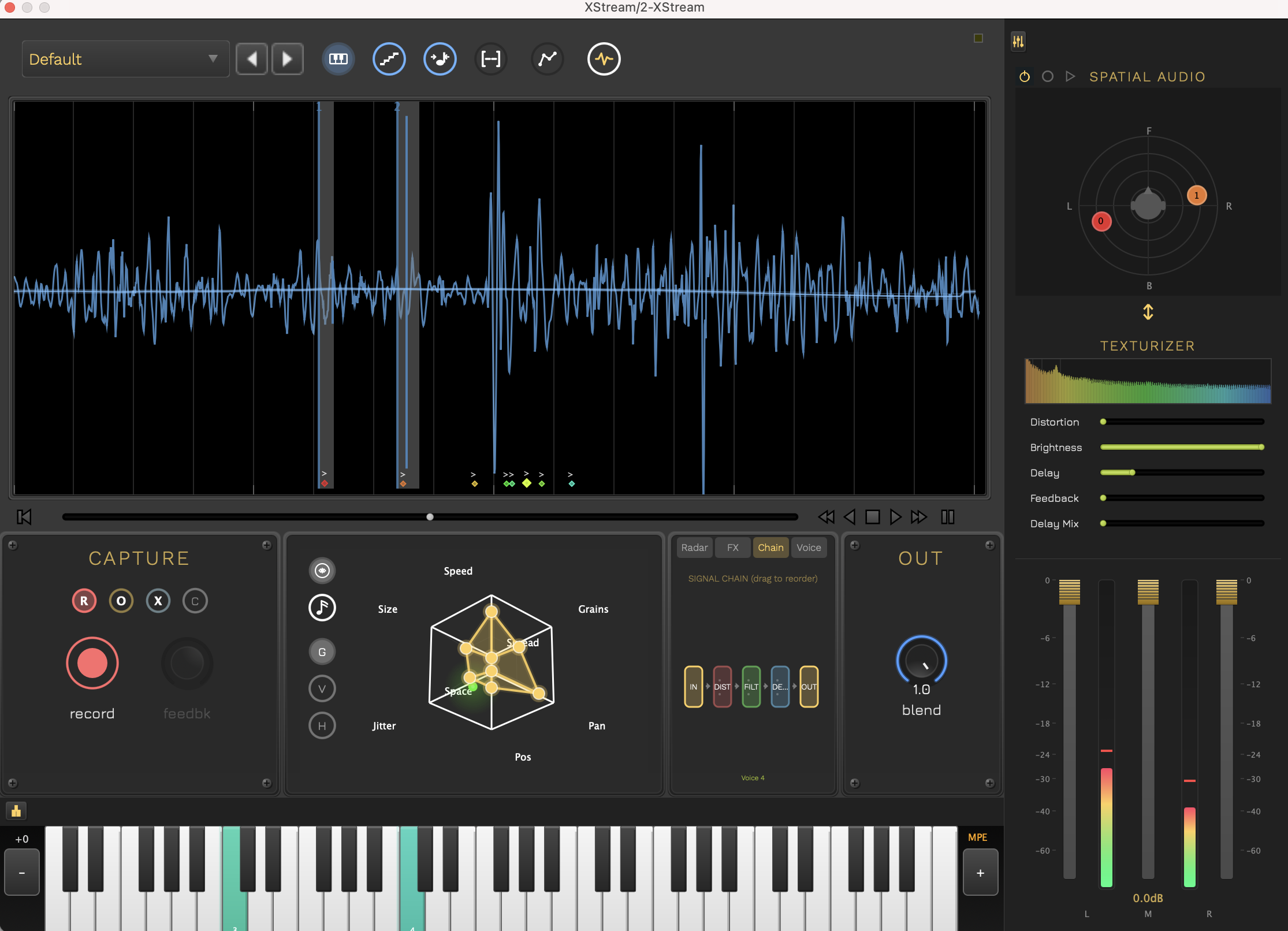
Download
Complete Feature Set
Foundation: Two Modes, Infinite Possibilities
Master the fundamentals of granular synthesis with two powerful approaches.
Single Mode
Turn Any Sound into Evolving Textures
- Grain-based time manipulation
- Independent pitch and time control
- Perfect for pads, drones, and atmospheres
- Real-time sample scrubbing
Multi Mode
Play Your Samples Like an Instrument
- Full polyphonic MIDI tracking
- Per-voice grain manipulation
- Create playable granular instruments
- Performance-ready with velocity sensitivity
3D Spatial Granular Synthesis
Take granular synthesis into the third dimension with immersive spatial audio.
Polyphonic 3D Spatializer
Each grain becomes a spatial object that can move through 3D space. Play chords where every note occupies its own position in the stereo field and beyond.
Binaural HRTF Processing
Powered by Steam Audio, experience true 3D positioning with head-related transfer functions for realistic spatial perception through headphones.
Integrated Spatial Control
New spatializer section in the interface for intuitive 2D positioning with per-voice control in Multi mode.
Motion & Automation
Animate grain positions in 3D space. Create swirling, orbiting, or random-walk grain clouds that evolve over time.
The Vision: Imagine playing a granular pad where each grain orbits around you in 3D space, or a polyphonic instrument where each note has its own spatial position. Phase 2 brings cinematic spatial audio to granular synthesis.
Polyphonic Effects Chain
Add character, aggression, and harmonic complexity with advanced polyphonic distortion.
Per-Voice Distortion
Independent distortion processing for each polyphonic voice. Create complex harmonies where each note has its own character and saturation.
Grain-Level Processing
Distort individual grains before they're mixed. Achieve unique timbres impossible with traditional distortion.
Multiple Distortion Algorithms
From warm tube saturation to aggressive digital destruction. Shape your sound with a palette of distortion types.
Spatial Distortion Integration
Combine Phase 2's spatial audio with Phase 3's distortion. Create aggressive, spatially-distributed soundscapes.
The Result: XStream is now a complete sound design powerhouse. From pristine granular textures to spatially-distributed aggressive synthesis. One plugin, limitless sonic possibilities.
Free Companion Apps
Parameter Space and Spectral Space have graduated from the plugin UI into their own free standalone applications. Along with the Leap Motion Controller, these companion apps connect to XStream via virtual MIDI.
Parameter Space
Octagonal Radar Control Surface
A dedicated full-screen interface for shaping up to 8 granular parameters simultaneously. Supports Global, Per-Voice, and Hybrid interaction modes with bi-directional sync to XStream.
- 8-axis parameter control (Size, Density, Spread, Jitter, Drive, Cutoff, Resonance, Delay)
- Per-voice polygon editing for unique timbres on each MIDI note
- Connects to XStream via virtual MIDI
Spectral Space
Timbre-Based Audio Navigator
A dedicated full-screen interface for exploring your audio as a cloud of segments positioned by timbral similarity. Navigate by feel rather than time, record trajectories, and scrub through spectral neighborhoods.
- 3D spectral visualization with cluster-based navigation
- Trajectory recording for automated evolving playback paths
- Connects to XStream via virtual MIDI
Leap Motion Controller
Gestural Instrument Control
Control XStream with hand gestures using a Leap Motion controller. Per-finger grain control, gesture-based loop commands, and expressive MPE output.
- Per-finger grain position, size, and pitch control
- Circle, swipe, and pinch gestures for loop control
- Connects to XStream via virtual MIDI / MPE
Why standalone? Moving these features out of the plugin gives them dedicated full-screen interfaces with more room to breathe. Run them on a second screen or tablet alongside XStream for a modular, hands-on workflow without cluttering the main plugin UI.
Installation
macOS
- Download and open the DMG file
- Double-click the PKG installer
- Follow the installation wizard
- Plugins will be installed automatically to:
- AU:
~/Library/Audio/Plug-Ins/Components/ - VST3:
~/Library/Audio/Plug-Ins/VST3/ - Standalone:
/Applications/
- AU:
- Restart your DAW and rescan plugins
Windows
- Download and extract the ZIP file
- Copy
XStream.vst3to:C:\Program Files\Common Files\VST3\ - Copy
XStream.exeto your preferred location - Restart your DAW and rescan plugins
Linux
- Download and extract:
tar -xzf xstream-linux.tar.gz - Copy
XStream.vst3to:~/.vst3/ - Copy
XStreamexecutable to your preferred location - Restart your DAW and rescan plugins
Getting Started
Two Modes, Infinite Possibilities
XStream offers two powerful modes for different creative workflows:
Single Mode
Traditional Granular Synthesis
- Load an audio sample or record live input
- Adjust grain size, density, and playback position
- Perfect for creating evolving textures, pads, and drones
- Use the position controls to scrub through your sample
Multi Mode
Polyphonic Granular Synthesis
- Play your samples chromatically across a MIDI keyboard
- Each key triggers independent granular voices
- Create playable granular instruments
- Full velocity sensitivity and polyphonic support
Basic Workflow
-
Load a Sample
Drag and drop an audio file or use the file browser to load your source material.
-
Choose Your Mode
Toggle between Single Mode for textures or Multi Mode for playable instruments.
-
Adjust Grain Parameters
- Grain Size: Controls the length of each grain
- Grain Density: How many grains play simultaneously
- Position: Where in the sample grains are captured from
-
Shape the Sound
Use the envelope controls to shape grain attack/release, and adjust pitch and time independently.
-
Add Effects
Apply built-in effects for further sound design and polish.
Single Mode Guide
Single Mode is perfect for creating evolving textures, ambient soundscapes, and granular transformations of your audio.
Recording Modes
Cycle through three recording modes to capture and manipulate live audio input:
1. Record Mode
Captures fresh audio into the buffer, replacing any existing content. Perfect for starting a new loop or texture from scratch.
- Clears the current buffer
- Records new audio from the beginning
- Best for: Starting new ideas
2. Overdub Mode
Layers new audio on top of existing material without erasing what's already there. Great for building complex, layered textures.
- Adds to existing audio
- Preserves previous recordings
- Best for: Building layers
3. Replace Mode
Selectively replaces sections of the buffer with new audio. Useful for updating specific parts while keeping the rest intact.
- Overwrites only recorded sections
- Maintains timing structure
- Best for: Refining loops
Single Workflow
-
Select Recording Mode
Cycle through Record, Overdub, or Replace mode using the mode selector.
-
Capture Audio
Hit record and capture live input or load a pre-recorded sample.
-
Adjust Grain Position
Use the position control to determine where grains are captured from the buffer.
-
Manipulate Time & Pitch
Independently control playback speed and pitch for creative transformations.
Multi Mode Guide
Multi Mode transforms your samples into fully playable, polyphonic granular instruments with MIDI control.
Voice Markers
Each active voice in Multi mode is shown as a colored diamond marker in the waveform display. The marker sits at the top of a vertical line whose height indicates the current grain size. Grain windows for each voice cluster visually around their diamond, giving you an at-a-glance view of where every voice is reading and how widely its grains are scattered.
Multi Workflow
-
Load Your Sample
Import an audio file that will serve as your sound source for the granular instrument.
-
Enable Multi Mode
Toggle to Multi mode to enable polyphonic MIDI tracking.
-
Play with MIDI
Use your MIDI keyboard to trigger granular voices chromatically across the keyboard range.
-
Adjust Per-Voice Settings
Right-click on VoicePlayHead markers to solo, mute, or adjust individual voice parameters.
-
Fine-Tune Grain Parameters
Adjust grain size, density, and envelope to shape the character of your instrument.
Performance Tips
- Use velocity to dynamically control grain density and volume
- Experiment with different sample start positions for varied timbres
- Layer multiple instances with different grain settings for rich textures
- Automate grain parameters in your DAW for evolving sounds
MIDI Mapping Editor
Complete MIDI CC and Program Change control for all parameters with an intuitive mapping interface.
Access the MIDI Mapping Editor
Press Command+M (macOS) or Ctrl+M (Windows/Linux) to open the centralized MIDI mapping interface.
Key Features
Comprehensive Parameter View
See all automatable parameters in a sortable table view, organized by category (Capture, Grain, Envelope, Mix, Playback, Locators).
MIDI Learn Mode
Click "Learn" next to any parameter, then move a MIDI controller or send a Program Change to instantly create the mapping.
Real-Time Activity Indicator
Visual feedback shows incoming MIDI CC and Program Change messages with their values, making mapping intuitive and immediate.
Persistent Mappings
All MIDI mappings are automatically saved to ~/XStream/MidiMappings.xml and persist across sessions and plugin instances.
Search & Filter
Quickly find parameters using the search box or filter by category to focus on specific sections of the plugin.
Program Change Support
Map MIDI Program Change messages to button parameters for instant preset switching or toggle controls via your MIDI controller.
Quick Start Guide
-
Open the MIDI Mapping Editor
Press Command+M (or Ctrl+M on Windows/Linux) to launch the mapping interface.
-
Find Your Parameter
Use the search box or category filter to locate the parameter you want to control.
-
Enter Learn Mode
Click the "Learn" button next to your desired parameter. The row will highlight to indicate learn mode is active.
-
Send MIDI
Move a knob, fader, or button on your MIDI controller. The mapping will be created instantly and displayed in the "Mapping" column.
-
Test Your Mapping
Close the editor and move your controller - the parameter will respond immediately. Watch the MIDI Activity indicator to confirm messages are being received.
Right-Click Context Menu
You can also access MIDI Learn directly from parameter controls:
- Right-click on any knob, slider, or button in the main interface
- Select "MIDI Learn" from the context menu
- Move your controller to create the mapping
- Select "Clear MIDI Mapping" to remove an existing assignment
Pro Tips
- Program Change for Buttons: Use MIDI Program Change messages to control button parameters (Pause, Freeze, Record modes, etc.)
- CC for Continuous Control: Use MIDI CC messages for knobs and sliders (Grain Size, Density, Position, etc.)
- One Controller, One Parameter: Each MIDI CC/PC number can only control one parameter at a time - new mappings replace old ones
- Persistent Across DAWs: Mappings are stored globally and work across all DAWs and plugin instances
- Clear Individual Mappings: Use the "Clear" button in the mapping editor or right-click menu to remove unwanted assignments
Development Updates
v1.8.4 - March 2026
- Tap Tempo Sync: New TAP button in toolbar (visible when sync enabled) — tap 2 beats to set buffer BPM, playback speed auto-adjusts to match DAW tempo. Bidirectional override with transport controls and speed slider
- MIDI Clock Indicator: Small LED in toolbar top-right shows incoming external MIDI clock status (gold when active)
- Save as WAV: Right-click buffer view to export audio as 24-bit WAV file with file chooser dialog
- Expanded Speed Range: Speed slider range extended from ±2x to ±10x to accommodate tempo-locked playback speeds
- CoreGraphics Crash Fix: Fixed SIGSEGV in CGGlyphBuilderLockBitmaps caused by setText/setVisible calls during paint() — moved UI mutations to timerCallback
- Stack Transients Default: Multi-mode now stacks all voice markers at the most prominent transient position by default
- Larger Preset Text: Increased font sizes across sample browser panel for better readability
- New Guitar Samples: Added JM Samples pack (5 guitar samples) and renamed "Irish Lilt" to "Lilting Loop"
- UI Polish: Renamed "SPATIAL AUDIO" to "SPATIALIZER", standalone default tempo set to 120 BPM
v1.8.3 - March 2026
- Global Mode Button: G button in multi-mode voice panel is now a momentary trigger with visual flash — no longer latches as a toggle, matching the transient interaction pattern
- Voice Selection Fix: Clicking voice dots in the voice selector now works immediately without requiring MIDI input first — voice ADSR and per-voice FX parameters display correctly on click
- DAW Buffer Recall Fix: Fixed audio buffer not restoring on DAW project reload — sample rate fallback for stopped engines, always persists buffer hash, no longer clears buffer when cache file is missing
- Global Mode Callback: Center dot in voice selector and G button both trigger Global mode via unified callback chain
v1.8.2 - March 2026
- MPE Controller Fix: Reverted multi-mode MIDI handling to proven v1.7.9 pattern — fixes per-note pitch bend doubling with GeoShred, Roli Seaboard, and Sensel in DAWs. Removed VST3 Note Expression patch and supportsMPE() declaration that caused duplicate pitch bend paths
- Pitch Bend Snap-Back Fix: Single-mode pitch bend now uses the correct profile-aware range instead of a hardcoded ±5 semitone range, eliminating the snap-back behaviour when bending notes
- Remove Silence: New buffer editing feature accessible via right-click context menu — gate-style silence detection with RMS analysis, ripple-delete consolidation, and crossfade stitching between audio regions
- Registration Persistence Fix: Fixed registration not persisting between launches — the settings file is now flushed to disk immediately after successful sign-in
- ASIO Support (Windows): Windows builds now include ASIO audio driver support for low-latency audio interfaces
- UI Polish: Drag handles for texturizer/spatializer sections and individual effects now use a dot-grid grip pattern instead of the hamburger icon; keyboard MIDI toggle uses a QWERTY keyboard icon; inactive toolbar toggles are greyed out instead of showing a blue ring
v1.8.1 - March 2026
- Preset Waveform Preview: Fixed waveform display for user-saved presets in the sample browser — was misreading the STREAM01 file header
- Clean Buffer Transitions: Eliminated audio bleed when switching between presets and sample pack samples — effects are now reset and a fade-in applied on buffer swap
- Multi Mode Visuals: Waveform display in Multi mode now uses matching blue color scheme; voice playhead markers are more visible and easier to grab
v1.8.0 - March 2026
- MPE in DAWs (VST3/AU): Fixed MPE pitch bend, pressure, and timbre not reaching the plugin in Ableton Live and other DAWs — VST3 Note Expression events are now correctly converted to MIDI
- Multi Mode Pitch Bend Fix: Resolved pitch bend snapping back toward initial pitch in Multi mode — expression data is now handled directly on voices without conflicting MPE instrument callbacks
- AAX Plugin: AAX format now included in the macOS installer for Pro Tools compatibility
v1.7.9 - March 2026
- 16 Grains per Voice: Maximum grain count doubled from 8 to 16 in both Single and Multi mode, enabling denser and more complex textures
- Stereo Routing: Grains now read from the correct stereo channel of the captured buffer, preserving stereo width on playback — in Multi mode, voices alternate across L/R channels automatically
- Sample Browser Panel: New collapsible left-side panel for browsing and loading sample packs directly into the granular engine
- Input Routing Matrix (Standalone): New audio input routing dialog lets you independently route any hardware input channel to the plugin's Left and/or Right input, supporting one-to-many mappings
- Expressive Controller Profiles: Added dedicated profiles for Seaboard, GeoShred, and Sensel controllers alongside generic MPE mode
- Multi Mode Stop Fix: Pressing stop in Multi mode now correctly fades out all active voices instead of leaving hanging notes
- MIDI Debug Logging Removed: Eliminated all runtime DBG logging from MIDI CC processing for cleaner performance in production builds
v1.7.8 - March 2026
- Windows Temp Session Recall: Improved plugin temp-state fallback restore so unsaved parameter changes and cached recorded audio are more reliably recalled when hosts do not round-trip in-memory state
v1.7.7 - March 2026
- Filter Cutoff Slider Inversion: The Texturizer filter cutoff slider direction is now inverted — right is open (20kHz, no filtering), left is closed (20Hz), matching standard filter control conventions
v1.7.6 - March 2026
- Multi Mode Grain Tracking Fix: Grains in Multi mode now stay flush with their voice marker at all speeds and pitches — the grain engine now mirrors Single mode exactly, with each voice's grains anchoring to their playhead at cycle boundaries and reading at the correct MIDI pitch rate
- Pause Button Background: The transport pause button background now matches the plugin background colour, eliminating the visible bounding box
v1.7.5 - March 2026
- Windows Audio Recall Fix: Audio buffers now save and restore correctly across DAW sessions on Windows — caused by silent directory creation failure when the XStream app data folder had not been initialised yet
- Audio Buffer Path Alignment: All audio buffers, temp state, and settings now share the same
Delta Sound Labs/XStream/directory on all platforms - Audio File Extension: New audio buffer files use the
.xstreamextension; existing.streamfiles are still loaded automatically for backward compatibility
v1.7.4 - March 2026
- Multi Mode Voice Marker Drag: Dragging a voice marker in the stream buffer while a note is playing now correctly holds its new position — previously the marker snapped back on every bar boundary
- ADSR Right-Click Look & Feel: The "Apply to all voices" popup in Multi mode now uses the plugin's custom look and feel instead of defaulting to the JUCE default style
v1.7.3 - March 2026
- Spatializer On by Default: New plugin instances now load with the spatializer enabled
- Version in Status Display: Current build version now shown alongside registration status in the toolbar and hamburger menus
- CI/CD Artifact Naming: All release artifacts now include the version number in their filename
- Audio Buffer Storage Fix: Session audio stored under
XStream/AudioBuffers, co-located with settings and trial files
v1.7.0 - March 2026
- Per-Grain Independent Jitter: Multi-mode jitter now randomises each grain individually rather than moving all grains as a rigid cluster — produces genuinely stochastic scatter at any pitch and note order
- Voice Playhead Alignment: Grain windows and playhead dots now render at the exact same horizontal position as their voice diamond marker at all zoom levels
- Spatializer Power State Fix: The spatializer power button now correctly reflects the saved on/off state on plugin load — previously the button could show ON while the spatializer displayed "Spatializer Off"
v1.6.9 - February 2026
- DAW Automation for Texturizer & Spatializer: Drive, filter, and delay sliders are now fully automatable from your DAW — changes are reflected in real time even when the plugin editor is closed
- Spatializer DAW Automation: Enable state, global X/Y position, and all 8 per-voice positions are now exposed as automatable parameters (
spatial_enabled,spatial_x/y,spatial_v0–v7_x/y) - UI State Recall: Texturizer sliders and spatializer node positions now correctly restore their values when a DAW project is reopened — previously the editor would reset to defaults on reopen
- Preset Combobox Fix: The preset selector now correctly shows the recalled preset name on DAW project reload instead of always defaulting to "Default"
- Multi-Mode Grain Params: Grain parameters panel adapts to the active mode, showing relevant controls for the current synthesis context
- MPE Grain Size Range: MPE expression now modulates grain size across a wider and more musical range
v1.6.8 - February 2026
- DAW Parameter Recall Fix: Saved parameter state now correctly restored in Ableton (and other hosts that send session state before prepareToPlay)
v1.6.7 - February 2026
- DAW Session Recall: Temporary buffer and parameter state now survives closing and reopening a DAW project — no longer overwritten by default preset on load
- Registration Fix: Plugin now correctly recognizes server-issued 30-day renewable licenses; registered users no longer hear silence
v1.6.6 - February 2026
- 7-Day Beta Trial: New installations start a 7-day free trial with full access to all features
- Trial Expiry Dialog: When the beta trial expires, the registration dialog appears automatically on next launch
- Binary Access Model: Trial or licensed users get full access; expired trial without a license results in silence — no partial feature set
- License Status Menu: Right-click the plugin toolbar to see trial days remaining, registered name, or expiry notice
v1.6.4 - February 2026
- 30-Day Free Trial: New installations automatically start a 30-day free trial with full access to all features
- XStream License Format: Plugin now validates XStream licenses from account.deltasoundlabs.com
v1.6.2 - February 2026
- Session Recall (Standalone): The standalone app now restores your previous session on launch — audio buffer and all parameter settings are automatically saved on quit and recalled on relaunch
- DAW Unsaved-Work Recovery: If you close a DAW project without saving, your audio buffer is preserved in a temp store and reloaded next time you open that session, protecting unsaved work
- Bitwig VST3 Crash Fix: Resolved initialization crash in Bitwig caused by invalid VST3 parameter notifications during plugin construction — eliminated "invalid parameter ID" host errors
v1.6.1 - February 2026
- Per-Voice ADSR Editing: Click any voice node in the VOICES circle — including inactive voices — to edit its ADSR envelope directly. Previously only active/releasing voices were editable
- Global ADSR via Center Node: Click the center node of the VOICES circle to show and edit the global ADSR envelope, which affects all voices without a per-voice override
- Apply ADSR to All Voices: Right-click anywhere in the ADSR editor to get an "Apply to all voices" option, instantly copying the current envelope to every voice and the global settings
- Voice Auto-Selection: The ADSR editor automatically selects the most recently triggered voice so you can immediately shape the envelope of what you just played
- Stroma Jitter Floor: When Stroma modulation is active, the jitter slider now retains at least 40% of its effect — previously Stroma could suppress the slider entirely during the attack phase
- Texturizer Default Wet: The Texturizer dry/wet slider now defaults to 50% (was 0%) for a more immediately useful starting point
Future Enhancements
- Preset management system
- Advanced modulation options
- Additional grain shapes and algorithms
Feedback & Bug Reports
We value your input! Please report any issues or share your thoughts:
- Email: connect@deltasoundlabs.com
- GitHub: Report a Bug
When reporting issues, please include:
- Operating system and version
- DAW name and version
- Plugin format (VST3, AU, Standalone)
- Steps to reproduce the issue
- Screenshots or audio examples (if applicable)